
Relating Area to Circumference: Dynamic GeoGebra Lesson
Loading the math board and drawing, please wait…
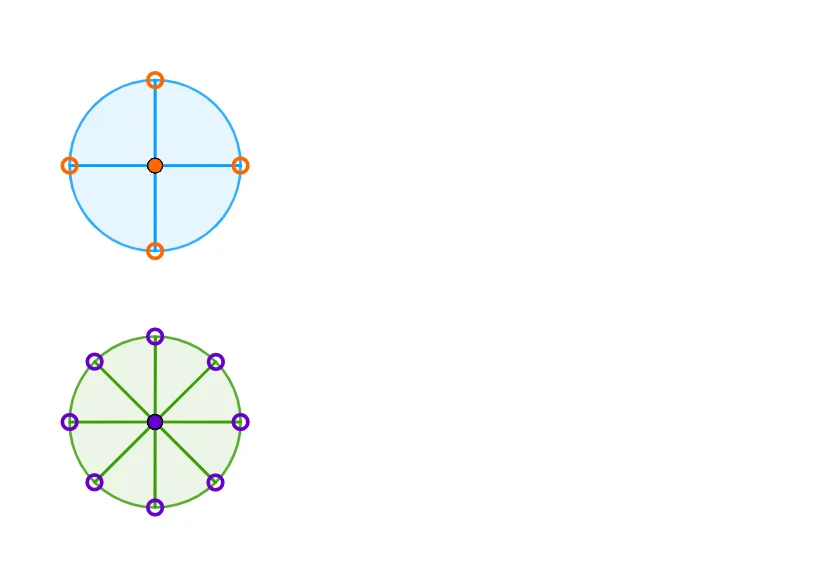
This GeoGebra example dynamically demonstrates the relationship between the area and circumference of a circle by slicing the circle into sectors and rearranging them into an approximate rectangle. The core mathematical concepts include the area formula A = πr², the circumference formula C = 2πr, and the limit idea that as the number of sectors increases, the rearranged shape approaches a rectangle. The construction uses commands such as CircleSector, Point, Angle, and Rotate to create and rotate multiple sectors, with objects like radii, central angles, arcs, and vertices. It is suitable for middle school (grades 7-8) or high school students, serving as a visual proof for deriving the area formula and understanding the role of π. The interactive nature allows learners to adjust the number of sectors and observe the transition from a circular arrangement to a rectangular one, reinforcing the connection between circumference and area.
GeoGebra Commands & Parameters
CircleSector((0, 0), (1, 0), (0, 1)) → cPoint(Circle[A1, radius]) → B1Angle(A1 + (1, 0), A1, B1) → d1Rotate(Translate[c, Vector[A1]], d1, A1) → c1Point(Circle[A2, radius]) → B2Point(Circle[A3, radius]) → B3Point(Circle[A4, radius]) → B4Angle(A2 + (1, 0), A2, B2) → d2Angle(A3 + (1, 0), A3, B3) → d3Angle(A4 + (1, 0), A4, B4) → d4Rotate(Translate[c, Vector[A2]], d2, A2) → c2Rotate(Translate[c, Vector[A3]], d3, A3) → c3Rotate(Translate[c, Vector[A4]], d4, A4) → c4CircleSector((0, 0), (1, 0), (0.7071067811865476, 0.7071067811865476)) → gPoint(Circle[E1, radius]) → F1Angle(E1 + (1, 0), E1, F1) → h1Rotate(Translate[g, Vector[E1]], h1, E1) → g1Point(Circle[E2, radius]) → F2Point(Circle[E3, radius]) → F3Point(Circle[E4, radius]) → F4Point(Circle[E5, radius]) → F5Point(Circle[E6, radius]) → F6Point(Circle[E7, radius]) → F7Point(Circle[E8, radius]) → F8Angle(E2 + (1, 0), E2, F2) → h2Angle(E3 + (1, 0), E3, F3) → h3Angle(E4 + (1, 0), E4, F4) → h4Angle(E5 + (1, 0), E5, F5) → h5Angle(E6 + (1, 0), E6, F6) → h6Angle(E7 + (1, 0), E7, F7) → h7Angle(E8 + (1, 0), E8, F8) → h8Rotate(Translate[g, Vector[E2]], h2, E2) → g2Rotate(Translate[g, Vector[E3]], h3, E3) → g3Rotate(Translate[g, Vector[E4]], h4, E4) → g4Rotate(Translate[g, Vector[E5]], h5, E5) → g5Rotate(Translate[g, Vector[E6]], h6, E6) → g6Rotate(Translate[g, Vector[E7]], h7, E7) → g7Rotate(Translate[g, Vector[E8]], h8, E8) → g8
AI Drawing Prompt Reference
Create a dynamic diagram illustrating the relationship between a circle's area and circumference. Start with a unit circle divided into several sectors (e.g., 4 and 8), each colored differently. Translate and rotate these sectors to rearrange them into an approximate rectangle. As the number of sectors increases, the rearranged shape approaches a rectangle. Include auxiliary lines for radius, central angles, and arcs, and label the formulas A=πr² and C=2πr. The layout should clearly show the transformation from circle to rectangle, facilitating observation of their relationship.
The prompt above was compiled from the original drawing commands and is for reference only.