
Regular Perimeter Algebra
Loading the math board and drawing, please wait…
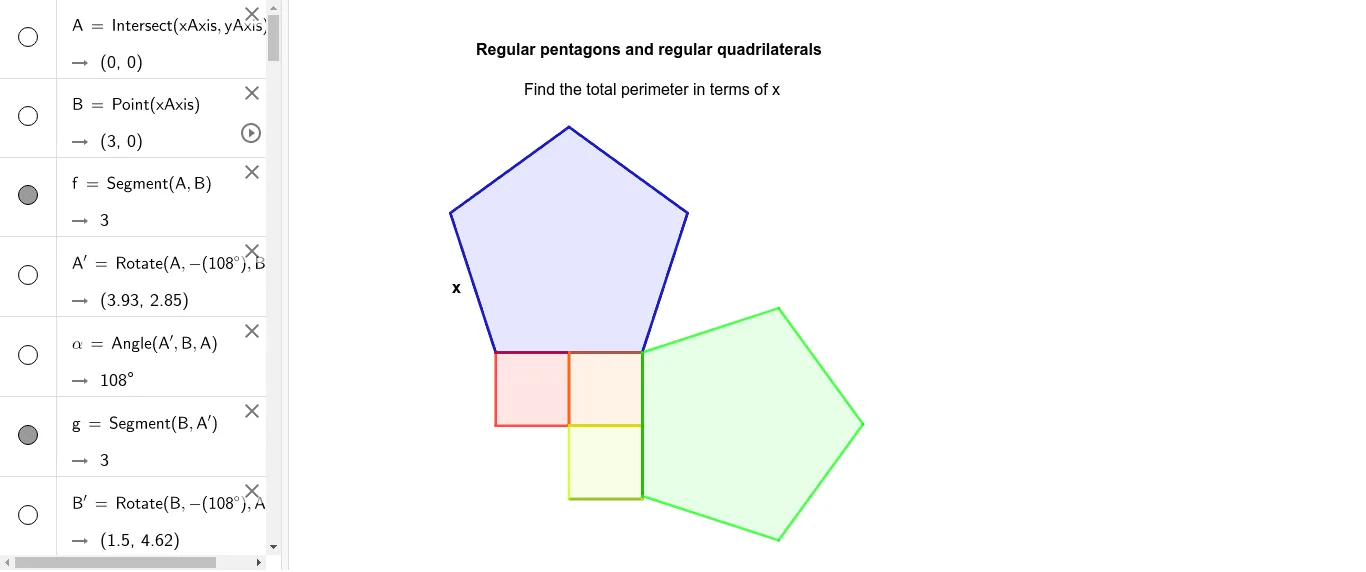
This example demonstrates the calculation and geometric properties of regular polygons' perimeters. It involves core math concepts like algebra, perimeter, plane figures, trigonometry, integral calculus, standard deviation, and statistics. Construction highlights include using GeoGebra commands like Intersect, Point, Segment, Rotate, Angle, and Polygon. Suitable for high school and above learners to understand geometric constructions and algebraic applications of regular polygons.
GeoGebra Commands & Parameters
Intersect(xAxis, yAxis) → APoint(xAxis) → BSegment(A, B) → fRotate(A, (-(108°)), B) → A'Angle(A', B, A) → αSegment(B, A') → gRotate(B, (-(108°)), A') → B'Angle(B', A', B) → βSegment(A', B') → hRotate(A', (-(108°)), B') → A''Angle(A'', B', A') → γSegment(B', A'') → iRotate(B', (-(108°)), A'') → B''Angle(B'', A'', B') → δSegment(A'', A) → jIntersect(i, j) → CIntersect(h, i) → DIntersect(g, h) → EIntersect(f, g) → FIntersect(f, j) → GPolygon(C, D, E, F, G) → poly1, c, d, e, f_1, g_1Intersect(f, j) → HPoint(Circle[H, 1.5]) → ISegment(H, I) → kRotate(H, 90°, I) → H'Angle(H, I, H') → εSegment(I, H') → lRotate(I, 90°, H') → I'Angle(I, H', I') → ζPolygon(H, I, H', I') → q1, h_1, i_1, h', i'Intersect(i_1, h') → JPoint(Circle[J, 1.5]) → KSegment(J, K) → mPolygon(J, K, 4) → poly2, n, p, q, r, L, MIntersect(f, g) → NIntersect(n, p) → OIntersect(n, p) → QSegment(Q, P) → sRotate(Q, 90°, P) → Q'Angle(Q, P, Q') → ηSegment(P, Q') → tIntersect(i_1, h') → RPolygon(R, Q', P, Q) → q2, r_1, q', p_1, q_1Intersect(f, g) → SPoint(s) → TSegment(S, T) → aRotate(S, (-(108°)), T) → S'Angle(S', T, S) → θSegment(T, S') → bRotate(T, 108°, S') → T'Rotate(T, (-(108°)), S') → T'_1Angle(T'_1, S', T) → ιSegment(S', T'_1) → j_1Rotate(S', (-(108°)), T'_1) → S''Angle(S'', T'_1, S') → κSegment(T'_1, S'') → k_1Segment(S'', S) → l_1Polygon(S, S'', T'_1, S', T) → poly3, s_1, s'', t'_1, s', t_1
AI Drawing Prompt Reference
Draw a regular pentagon and rotate it around its center multiple times to create similar shapes, showing the relationship between rotation angles and side lengths. Inside the pentagon, draw an inscribed square and rotate it around its center to create another square. Finally, draw a regular hexagon outside the pentagon and connect corresponding vertices to form multiple triangles, demonstrating geometric transformations and algebraic calculations.
The prompt above was compiled from the original drawing commands and is for reference only.