
Hexagon Phase Demonstration
Loading the math board and drawing, please wait…
In collections
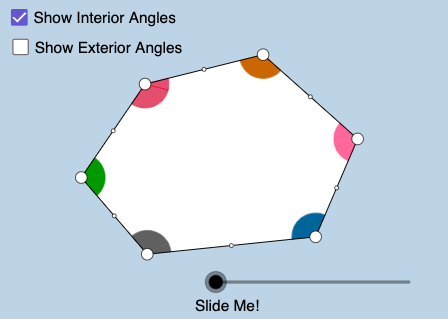
Polygon Angles: Interactive Exploration
This example demonstrates the geometric construction and properties of a hexagon. It involves core concepts such as angles, polygons, trigonometric functions, and integrals. The construction uses commands like Circle, Ray, Intersect, Segment, CircleSector, Vector, Translate, Dilate, If, Polygon, Point, Midpoint, Rotate, Line, and CircleArc. It is suitable for high school mathematics education, helping students understand polygon properties and their relationship with function graphs.
GeoGebra Commands & Parameters
Circle(C, 1.5) → hRay(C, D) → cIntersect(h, c, 1) → PRay(A, B) → aRay(B, C) → bRay(E, A) → eCircle(A, 1.5) → fCircle(B, 1.5) → gCircle(D, 1.5) → kCircle(E, 1.5) → pSegment(C, A) → iSegment(C, E) → jIntersect(f, a, 1) → FIntersect(f, i, 1) → GIntersect(f, e, 1) → HIntersect(f, e, 2) → IIntersect(p, e) → J,Intersect(p, j) → K,Intersect(k, c, 2) → OIntersect(h, j, 1) → QIntersect(h, i, 1) → RIntersect(h, b, 1) → SIntersect(g, a, 2) → TIntersect(g, b, 1) → UIntersect(g, a, 1) → VCircleSector(A, F, G) → qCircleSector(A, G, H) → rCircleSector(B, U, V) → sCircleSector(C, Q, R) → c_1CircleSector(C, R, S) → d_1Intersect(k, c, 1) → WCircleSector(E, J, K) → h_1CircleSector(A, I, F) → p_1CircleSector(B, T, U) → q_1Intersect(h, b, 2) → ZCircleSector(C, Z, P) → r_1Vector(A, B) → uVector(C, B) → vVector(E, D) → wVector(C, D) → u_1Vector(C, E) → v_1Vector(A, E) → w_1Translate(d_1, v) → s_1Dilate(C, If[1 < l ≤ 2, 2 - l, 0], E) → C'_1Dilate(C, If[2 < l ≤ 3, 3 - l, 0], D) → C'_2Dilate(E, If[2 < l ≤ 3, 3 - l, 0], D) → E'Vector(A, B) → a_1Vector(E, E') → j_1Vector(C, C'_2) → l_1Vector(C, C'_1) → m_1Translate(r, w_1) → r'_2Translate(c_1, v_1) → f_2Translate(c_1, m_1) → g_2Translate(q, a_1) → r'Vector(D, C) → u_2Vector(E, C) → v_2Vector(A, C) → w_2Vector(B, C) → l_2Dilate(B, If[0 < o < 1, 1 - o, 0], C) → B'Dilate(A, If[1 < o < 2, 2 - o, 0], C) → A'_2Dilate(E, If[2 < o < 3, 3 - o, 0], C) → E'_1Dilate(D, If[3 < o < 4, 4 - o, 0], C) → D'Vector(B, B') → m_2Vector(A, A'_2) → n_2Vector(E, E'_1) → s_2Vector(D, D') → t_2Translate(q_1, m_2) → c_3Translate(q_1, l_2) → d_3Translate(p_1, w_2) → e_3If(1 < o < 2, Translate[p_1, n_2]) → h_3Ray(D, A_1) → a_3Ray(A_1, E) → b_3Circle(A_1, 1.5) → q_3Intersect(q_3, b_3, 1) → NIntersect(q_3, a_3, 2) → B_1Intersect(k, c, 2) → C_1Intersect(k, a_3, 1) → D_1Intersect(k, c, 1) → E_1Intersect(p, b_3, 1) → F_1Dilate(C, If[2 < l < 3, 3 - l, 0], A_1) → C'_3Vector(E, A_1) → f_1Vector(C, A_1) → g_1Vector(C, C'_3) → b_2Intersect(q_3, a_3, 1) → I_1CircleSector(D, D_1, E_1) → k_3Vector(C, D) → j_2Vector(A_1, D) → u_3Intersect(p, b_3, 2) → J_1Polygon(A, B, C) → poly1, c_4, a_4, b_4Polygon(A, C, E) → poly2, e_4, a_5, c_5Polygon(E, C, A_1) → poly3, a_6, e_5, c_6Polygon(A_1, C, D) → poly4, d_4, a_7, c_7Polygon(A, B, C, D, A_1, E) → poly5, a_8, b_5, c_8, d_5, a_9, e_6Intersect(e, e_6) → K_1Intersect(p, e, 1) → L_1CircleSector(E, J_1, L_1) → f_4CircleSector(A_1, B_1, N) → g_4CircleSector(D, C_1, D_1) → h_4Vector(E, C) → j_3Vector(A_1, C) → l_3Vector(D, C) → m_3Translate(f_4, j_3) → k_4Translate(g_4, l_3) → p_4Translate(h_4, m_3) → q_4Dilate(E, If[2 < o < 3, 3 - o, 0], C) → E'_3Dilate(A_1, If[3 < o < 4, 4 - o, 0], C) → M_7Dilate(D, If[4 < o < 5, 5 - o, 0], C) → D'_1Vector(E, E'_3) → n_3Vector(A_1, M_7) → u_4Vector(D, D'_1) → v_4If(2 < o < 3, Translate[f_4, n_3]) → r_4If(3 < o < 4, Translate[g_4, u_4]) → s_4If(4 < o < 5, Translate[h_4, v_4]) → t_4Ray(C, A_1) → l_4Ray(C, E) → m_4Point(l_4) → N_1Point(m_4) → O_1Segment(D, C) → n_4Segment(C, B) → f_5Segment(B, A) → g_5Segment(A, E) → h_5Segment(E, A_1) → i_5Segment(A_1, D) → j_5Midpoint(f_5) → M_2Midpoint(g_5) → M_1Rotate(d_1, If[0 < l ≤ 1, ((-l) * 180°), -180°], M_2) → dRotate(C, If[0 < l ≤ 1, ((-l) * 180°), -180°], M_2) → C'Segment(M_2, C') → tRotate(q, If[0 < l ≤ 1, (l * 180°), 180°], M_1) → q'Rotate(A, If[0 < l ≤ 1, (l * 180°), 180°], M_1) → A'Segment(M_1, A') → e_1Rotate(R, 180°, M_2) → R'Line(B, R') → k_1Ray(E, O_1) → i_1Midpoint(h_5) → M_6Rotate(r, If[1 < l ≤ 2, ((-(l - 1)) * 180°), -180°], M_6) → r'_1Rotate(A, If[1 < l ≤ 2, ((-(l - 1)) * 180°), -180°], M_6) → A'_1Segment(M_6, A'_1) → n_1CircleSector(E, K, F_1) → c_2Midpoint(i_5) → M_5Rotate(E, If[2 < l ≤ 3, ((-(l - 2)) * 180°), -180°], M_5) → E'_2Segment(M_5, E'_2) → a_2Rotate(c_2, If[2 < l ≤ 3, ((-(l - 2)) * 180°), -180°], M_5) → d_2Segment(A_1, C) → e_2Intersect(h, e_2, 1) → U_1CircleSector(C, U_1, Q) → h_2CircleSector(C, P, U_1) → k_2Vector(C, C'_3) → t_1Translate(h_2, t_1) → p_2Intersect(q_3, e_2, 1) → R_1CircleSector(A_1, N, R_1) → q_2CircleSector(A_1, R_1, I_1) → r_2Vector(C, A_1) → i_2Translate(U_1, i_2) → S_1Ray(A_1, S_1) → f_3Midpoint(j_5) → M_4Midpoint(n_4) → M_3Rotate(k_2, If[3 < l ≤ 4, ((l - 3) * 180°), 180°], M_3) → g_3Rotate(C, If[3 < l ≤ 4, ((l - 3) * 180°), 180°], M_3) → C'_4Rotate(U_1, 180°, M_3) → W_1Segment(M_3, C'_4) → i_3Rotate(r_2, If[3 < l ≤ 4, ((-(l - 3)) * 180°), -180°], M_4) → p_3Rotate(A_1, If[3 < l ≤ 4, ((-(l - 3)) * 180°), -180°], M_4) → Z_1Segment(M_4, Z_1) → r_3Line(D, W_1) → s_3CircleArc(C, R, S) → t_3CircleArc(A, F, G) → k_5CircleArc(C, Q, R) → p_5CircleArc(A, G, H) → q_5CircleArc(C, U_1, Q) → r_5CircleArc(E, K, F_1) → s_5CircleArc(C, P, U_1) → t_5CircleArc(A_1, R_1, I_1) → d_6
AI Drawing Prompt Reference
Draw a regular hexagon with six equilateral triangles and six circular arcs. Construct it by drawing circles first, then connecting their intersection points to form the hexagon. Ensure symmetry and clear lines for educational use.
The prompt above was compiled from the original drawing commands and is for reference only.