
Refract a ray (Snell's Law)
Loading the math board and drawing, please wait…
In collections
Light
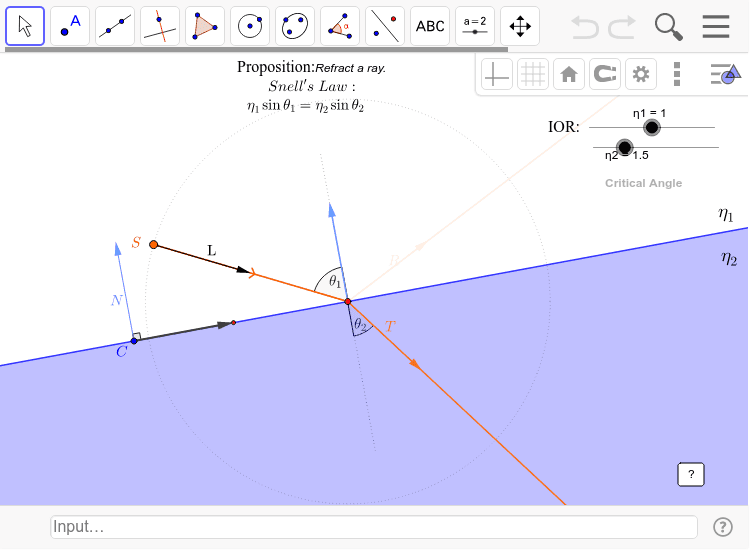
This example demonstrates the refraction of a light ray across a flat surface between two media of different densities, illustrating Snell's Law. Key mathematical concepts include Snell's Law, angles of incidence and refraction, vector operations, and unit vectors. The construction utilizes GeoGebra commands and objects like sign2, Circle, Point, Segment, UnitVector, Vector, Line, UnitOrthogonalVector, Angle, If, IntersectScreen, Min, and Ray as detailed in the construction summary. It is suitable for high school physics and mathematics education to visually understand refraction principles and mathematical modeling.
GeoGebra Commands & Parameters
sign2(η2 - η1) → σ2Circle(S, 1) → cPoint(c) → ASegment(S, A) → SAUnitVector(SA) → LCircle(C, 1) → dPoint(d) → DVector(C, D) → vSegment(C, D) → CDLine(C, D) → lineCDPoint(lineCD) → X'Circle(X', 2) → fPoint(f) → S'UnitOrthogonalVector(v) → NAngle(v, N) → βVector(C, S) → wsign2((w * N)) → σsign2((((-σ) * L) * N)) → dirSegment(X - (1.5 * N), X + (1.5 * N)) → eIf(dir ≟ 1, C + (t * v), S + (20 * L)) → X2Segment(S, X2) → incidentIntersectScreen(C + (0.2 * N), D + (0.2 * N), Corner[1], Corner[3]) → LBL1IntersectScreen(C - (0.2 * N), D - (0.2 * N), Corner[1], Corner[3]) → LBL2Angle(X + N2, X, S) → θ_1Min((k1 + k2) / 2, 1) → rflVector(If[dir ≟ 1, ((-z_N^(2)) * conjugate(z_L)), L]) → RRay(X2, R) → reflectionVector(If[dir ≟ 1, (((-σ) * z_N) * zθ2), (0, 0)]) → TRay(X, T) → transmissionAngle(X - N2, X, X + T) → θ_2
AI Drawing Prompt Reference
Illustrate a light ray refracting across a flat surface between two media of different densities, demonstrating Snell's Law. Show the incident ray, normal line, refracted ray, and reflected ray, with angles of incidence and refraction labeled. Use vectors to represent the directions of the rays and the normal. Draw the boundary between the two media, then the incident ray direction, calculate the refracted and reflected ray directions, and finally represent each ray with arrows.
The prompt above was compiled from the original drawing commands and is for reference only.