
Reflection over the y-axis
Loading the math board and drawing, please wait…
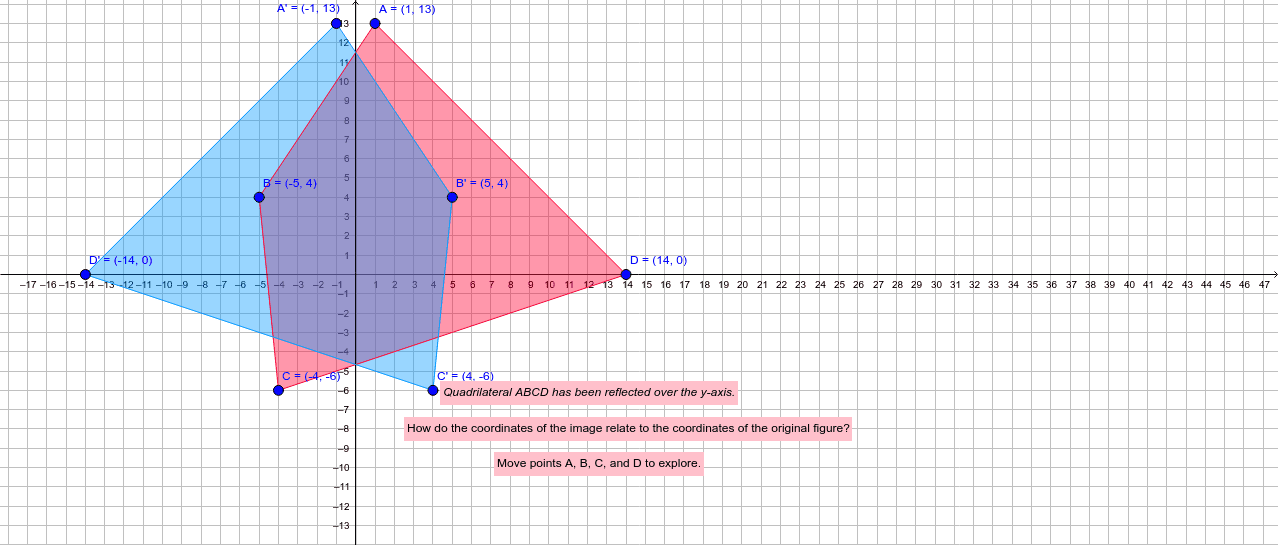
① This example demonstrates the reflection (axial symmetry) of a polygon across the y-axis, showing how the original shape maps to its mirror image. ② The core mathematical concept is reflection in coordinate geometry: each point (x, y) maps to (-x, y), preserving the y-coordinate while negating the x-coordinate, resulting in a mirror image across the vertical axis. ③ Construction details: using GeoGebra commands such as Polygon to create the original polygon poly1 with vertices A, B, C, D; Point to define key points; Line to draw the y-axis as the mirror line; and Mirror to reflect the polygon and its sides (a, b, c, d) to produce the image poly1' and corresponding sides a', b', c', d'. Text objects are used for labels or coordinate annotations. ④ Suitable for middle school geometry lessons, high school coordinate geometry introductions, and teachers creating interactive transformation demonstrations to help students grasp the coordinate rules and properties of reflection.
GeoGebra Commands & Parameters
Polygon(A, B, C, D) → poly1, a, b, c, dPoint(xAxis) → GPoint(yAxis) → HLine(G, H) → eMirror(A, e) → A'Mirror(B, e) → B'Mirror(C, e) → C'Mirror(D, e) → D'Polygon(A', B', C', D') → poly1', a', b', c', d'
AI Drawing Prompt Reference
Draw a quadrilateral with vertices near the coordinate axes, then construct its reflection across the y-axis. First plot the original quadrilateral, then draw the y-axis as the mirror line. For each vertex, find its mirror point by negating the x-coordinate while keeping the y-coordinate unchanged, and connect these points to form the reflected quadrilateral. Use dashed lines or different colors to distinguish the original from its mirror image, and label the axis of symmetry.
The prompt above was compiled from the original drawing commands and is for reference only.