
Reflection Over a Graph
Loading the math board and drawing, please wait…
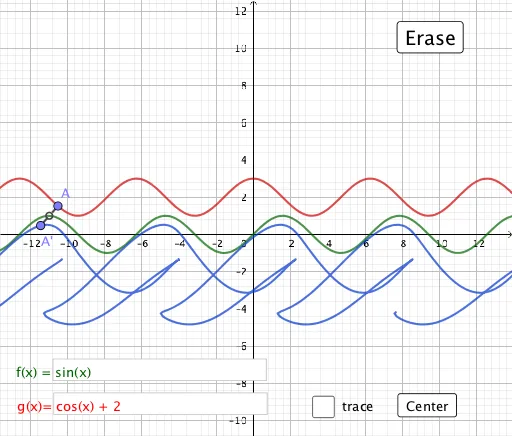
① This example demonstrates how to reflect a function graph over a given line (axis of symmetry) and dynamically observe the relationship between the original and reflected images. ② The core mathematical concept is reflection (axial symmetry) in plane geometry, involving function graphs, tangent lines, perpendicular lines, and loci, combined with algebraic expressions and interactive geometric construction. ③ Construction highlights: using GeoGebra commands such as Point, OrthogonalLine, Tangent, Intersect, Textfield, Mirror, Locus, and Segment, the construction includes function f, point A, perpendicular line h, tangent i, intersection j, reflected point A', locus loc1, as well as input boxes and buttons, allowing users to change the reflection axis or function parameters and update the reflected result in real time. ④ Suitable for high school or early college students learning geometric transformations and function graphs, and for teachers to demonstrate in class to help students intuitively understand the algebraic and geometric meaning of reflection.
GeoGebra Commands & Parameters
Point(g) → AOrthogonalLine(A, g) → hTangent(A, g) → iOrthogonalLine(A, i) → jIntersect(f, j) → DTextfield(f) → InputBox1Textfield(g) → InputBox2Intersect(f, j, (-10.965067638049936, 0.999534708254917)) → BMirror(A, B) → A'Locus(A', A) → loc1Segment(A, A') → k
AI Drawing Prompt Reference
Draw a function graph and a given line. Place a movable point on the function. Construct a line through this point perpendicular to the given line, then draw the tangent to the function at the point, and a line perpendicular to this tangent. Find the intersection of this perpendicular with the function graph. Use this intersection as the center to reflect the movable point, obtaining its image point. As the original point moves along the function, trace the locus of the reflected point. Also draw the segment connecting the original and reflected points. Provide two input fields to change the function expression and the line equation, so the reflected curve updates dynamically.
The prompt above was compiled from the original drawing commands and is for reference only.