
Reflection of Circular Wave
Loading the math board and drawing, please wait…
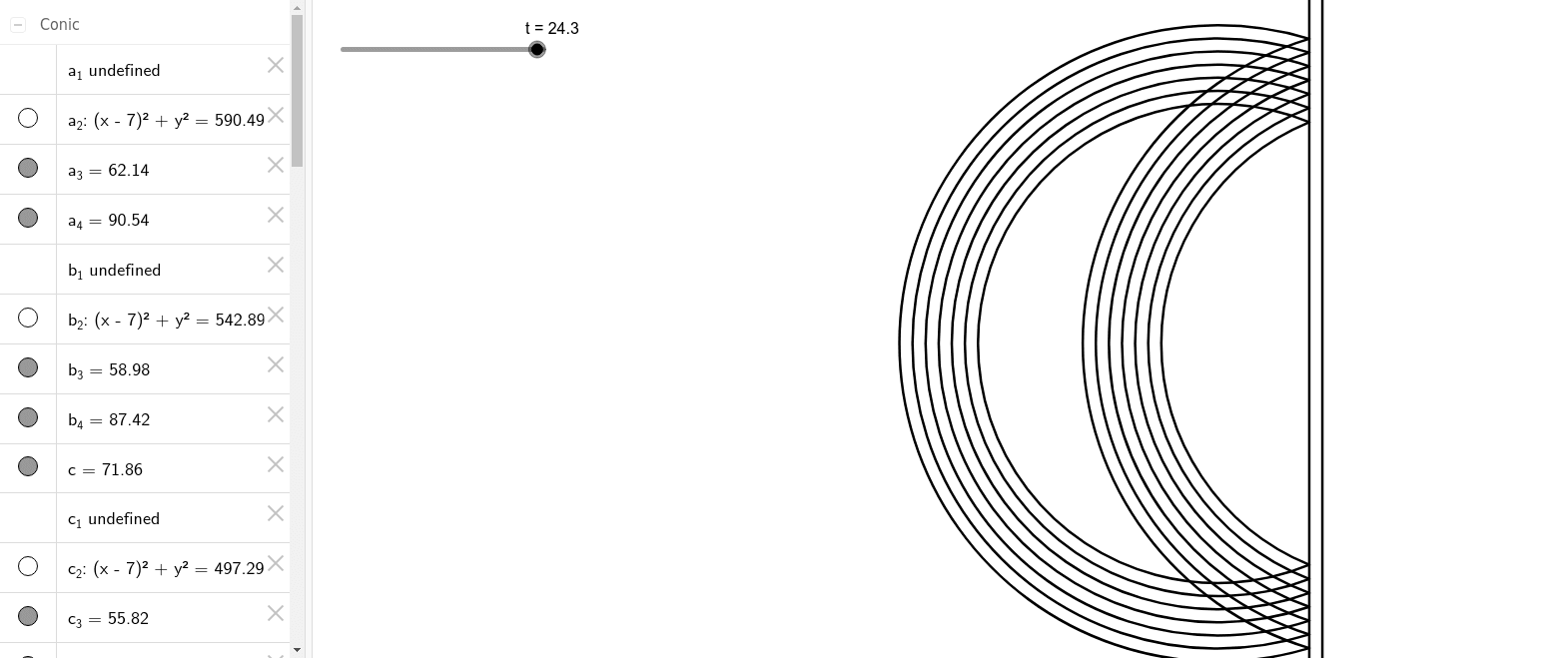
① This GeoGebra example dynamically demonstrates how a circular wave (arc-shaped wavefront emitted from a point source) reflects off a straight boundary, visually illustrating the law of reflection. ② Core mathematical concepts include the law of reflection (angle of incidence equals angle of reflection), construction of circular arcs, symmetry of points with respect to a line, and the use of conditional logic (If command) to separate incident and reflected wave regions. ③ Construction details: Point defines the source and boundary points, Line creates the reflecting boundary, CircleArc draws the incident and reflected arc wavefronts, Intersect finds intersection points between arcs and the boundary, and If controls visibility of different regions; the object list includes numerous points (A, B, C, D, E, F, G, H, I, J, K, L, M, N) and auxiliary segments (a_1~a_4, b_1~b_4, c_1~c_4, d_1~d_4, e_1~e_4, f_1, f_2, g_1, g_2) to build dynamic wavefront propagation. ④ Suitable for high school physics or mathematics students learning wave phenomena, reflection laws, and geometric transformations, as well as for introductory university physics demonstrations to understand the geometric essence of wavefront-boundary interactions.
GeoGebra Commands & Parameters
Point(yAxis) → APoint(yAxis) → BLine(A, B) → fPoint(xAxis) → CPoint(xAxis) → DIf(t > 7, Circle[D, t]) → a_2Intersect(a_2, f, 1) → EIntersect(a_2, f, 2) → FCircleArc(D, E, F) → a_3CircleArc(C, E, F) → a_4If(t ≤ 7, Circle[C, t]) → a_1If(t ≤ 8, Circle[C, t - 1]) → b_1If(t > 8, Circle[D, t - 1]) → b_2Intersect(b_2, f, 1) → GIntersect(b_2, f, 2) → HCircleArc(D, G, H) → b_3CircleArc(C, G, H) → b_4If(t ≤ 9, Circle[C, t - 2]) → c_1If(t ≤ 10, Circle[C, t - 3]) → d_1If(t ≤ 11, Circle[C, t - 4]) → e_1If(t ≤ 12, Circle[C, t - 5]) → f_1If(t ≤ 13, Circle[C, t - 6]) → g_1If(t > 9, Circle[D, t - 2]) → c_2If(t > 10, Circle[D, t - 3]) → d_2If(t > 11, Circle[D, t - 4]) → e_2If(t > 12, Circle[D, t - 5]) → f_2If(t > 13, Circle[D, t - 6]) → g_2Intersect(c_2, f, 1) → IIntersect(c_2, f, 2) → JCircleArc(D, I, J) → c_3CircleArc(C, I, J) → c_4Intersect(d_2, f, 1) → KIntersect(d_2, f, 2) → LCircleArc(D, K, L) → d_3CircleArc(C, K, L) → d_4Intersect(e_2, f, 1) → MIntersect(e_2, f, 2) → NCircleArc(D, M, N) → e_3CircleArc(C, M, N) → e_4Intersect(f_2, f, 1) → OIntersect(f_2, f, 2) → PCircleArc(D, O, P) → f_4CircleArc(C, O, P) → g_3Intersect(g_2, f, 1) → QIntersect(g_2, f, 2) → RCircleArc(D, Q, R) → dCircleArc(C, Q, R) → cLine(S, T) → h