
Reflection Line and Polygon Mirror Construction
Loading the math board and drawing, please wait…
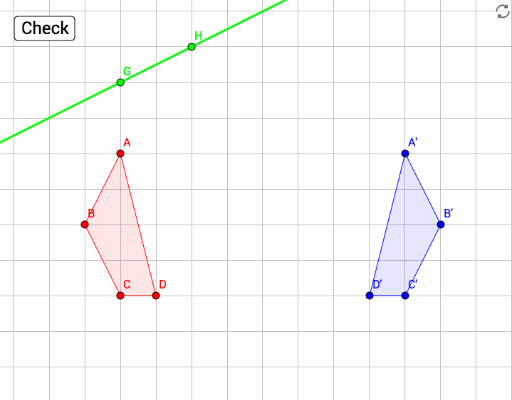
This GeoGebra example demonstrates axial reflection of a polygon across a given line, dynamically generating the mirror-image polygon and illustrating the geometric phenomenon of symmetry. Core mathematical concepts include reflection transformation, corresponding vertices of polygons, line-point relationships, and properties of symmetric figures in plane geometry. The construction uses the Polygon command to build the original polygon poly1, Line commands to define reflection axes such as a and b, and the Mirror command to produce the reflected image poly1' together with vertices A', B', C', D'. Additional objects including points A, B, C, D, E, F, G, H and interactive buttons tryAgain, correct, button1, nailedIt support immediate feedback and guided practice. Suitable for middle school and high school geometry instruction, classroom demonstrations, and student-centered exploration of transformation geometry.
GeoGebra Commands & Parameters
Polygon(A, B, C, D) → poly1, a, b, c, dLine(E, F) → fMirror(A, f) → A'Mirror(B, f) → B'Mirror(C, f) → C'Mirror(D, f) → D'Polygon(A', B', C', D') → poly1', a', b', c', d'Line(G, H) → g
AI Drawing Prompt Reference
Please draw a polygon and its reflection across a line. First, construct a polygon with four vertices. Then, define a line to serve as the axis of symmetry. Next, reflect each vertex of the polygon across this line to obtain new vertices. Finally, use these new vertices to construct the reflected polygon. Additionally, you can define another line for extra reference.
The prompt above was compiled from the original drawing commands and is for reference only.