
Reflection in the y-axis: Interactive GeoGebra Demo
Loading the math board and drawing, please wait…
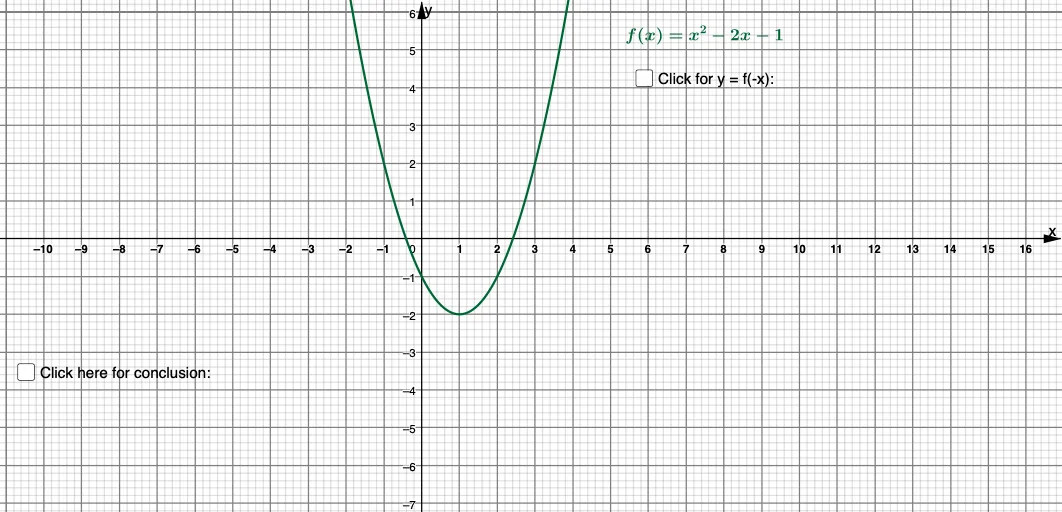
This GeoGebra example demonstrates the reflection (mirror) transformation of a graph or geometric object across the y-axis. The core mathematical concept is axial symmetry in the Cartesian coordinate system, where every point (x, y) maps to (-x, y). It involves function symmetry, quadratic equations, tangent functions, secant lines, and exponents. The construction uses GeoGebra objects such as f (likely a function), c (possibly a curve or circle), d (possibly a line or reflected object), and text objects (text1, text2, text5, text6, text7) for labels, with parameter a controlling dynamics. This is suitable for middle and high school students learning about function symmetry, coordinate transformations, and geometric reflections, and is ideal for classroom demonstrations or self-guided exploration of reflection properties.
GeoGebra Commands & Parameters
f(x) = x^(2) - (2 * x) - 1Boolean c(false)d: y = f((-x))Boolean a(false)
AI Drawing Prompt Reference
Draw a parabola symmetric about the y-axis with the function y=x^2-2x-1. First, plot the original function, then reflect it across the y-axis using the negative x-values to create the symmetric shape. Finally, add a toggle to show or hide the symmetric shape.
The prompt above was compiled from the original drawing commands and is for reference only.