
Reflection in Regular Polygon
Loading the math board and drawing, please wait…
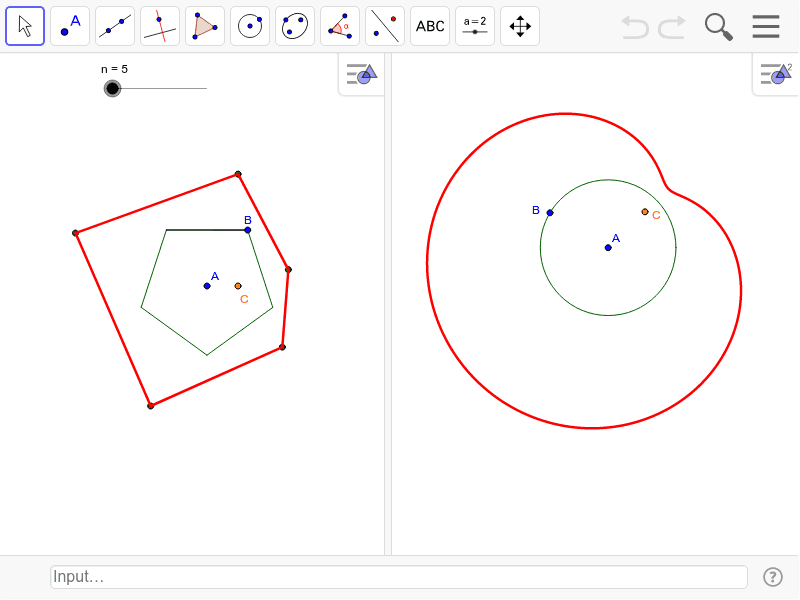
This example demonstrates how to reflect a point in the sides of a regular polygon to generate another polygon. It involves core mathematical concepts such as reflection, symmetry, and polygon geometry. The construction uses GeoGebra commands like Rotate, Segment, Sequence, Circle, Point, Tangent, Mirror, and Locus. Suitable for middle school and above mathematics education, helping to understand geometric transformations and symmetry.
GeoGebra Commands & Parameters
Rotate(B, 360 * ° / n, A) → B'Segment(B, B') → aSequence(Segment[Rotate[B, 360° * k / n, A], Rotate[B', 360° * k / n, A]], k, 0, n - 1) → list1Sequence(Mirror[C, Element[list1, i]], i, 1, n) → list2Sequence(Segment[Element[list2, i], Element[list2, i + 1]], i, 1, n - 1) → list3Segment(Element[list2, n], Element[list2, 1]) → bCircle(D, E) → cPoint(c) → GTangent(G, c) → d,Mirror(F, d) → F'Locus(F', G) → loc1
AI Drawing Prompt Reference
Draw a regular polygon and reflect a point on each of its sides to create another polygon. Show the reflected points, sides, and the new polygon, along with the locus of the reflection points to illustrate symmetry and geometric transformations.
The prompt above was compiled from the original drawing commands and is for reference only.