
Reflection and Refraction for iPad
Loading the math board and drawing, please wait…
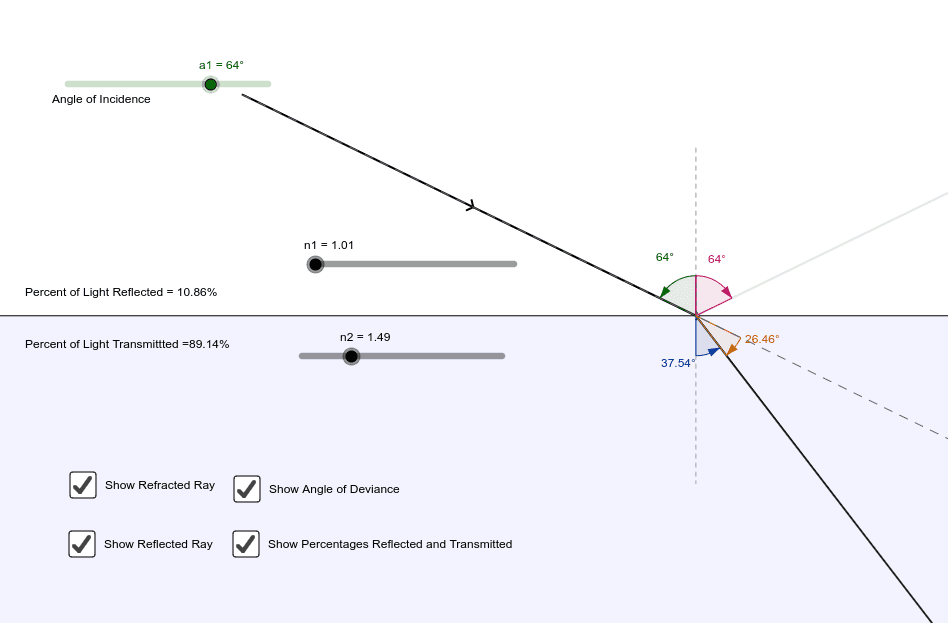
This example demonstrates the phenomena of reflection and refraction. Key mathematical concepts include angles, transformations, and geometric construction. Using GeoGebra commands such as Point, Segment, Rotate, and Mirror, the path of light can be dynamically shown. Suitable for high school physics and mathematics education.
GeoGebra Commands & Parameters
Point(xAxis) → CSegment(E, F) → bRotate(B, a1, A) → B'Segment(B', A) → dRotate(B', -a1 - 3.14159 + asin(n1 * sin(a1) / n2), A) → BRMirror(B', b) → B''Angle(E, A, B') → αAngle(B'', A, E) → βAngle(F, A, BR) → γPoint(xAxis) → DPoint(xAxis) → GPolygon(D, G, H, I) → poly1, d_1, g, h, iPolygon(D, J, K, G) → poly2, d_2, j, k, g_1Segment(D, G) → cRay(A, B'') → aRay(A, BR) → fPolygon(L_1, M_1, N_1, O_1) → poly3_1, l_1, m_1, n_1, o_1Polygon(L_3, M_3, N_3, O_3) → poly3_3, l_3, m_3, n_3, o_3Polygon(L_4, M_4, N_4, O_4) → poly3_2, l_2, m_2, n_2, o_2Polygon(L_5, M_5, N_5, O_5) → poly3_4, l_4, m_4, n_4, o_4Ray(B', A) → nPoint(n) → PAngle(BR, A, P) → δAngle(P, A, BR) → εTextfield(n2) → inputBox1Textfield(n1) → inputBox2Textfield(a1) → inputBox3
AI Drawing Prompt Reference
Draw the reflection and refraction of a light ray between two media, highlighting key angles and transformations. Start with an initial light ray, then use rotation and reflection to show the reflected and refracted rays. Label the incident, reflected, and refracted angles, and dynamically display the light path. Use polygons and rays to represent the light paths and angle relationships, suitable for physics and mathematics education.
The prompt above was compiled from the original drawing commands and is for reference only.