
Reflect a Ray of Light
Loading the math board and drawing, please wait…
In collections
Light
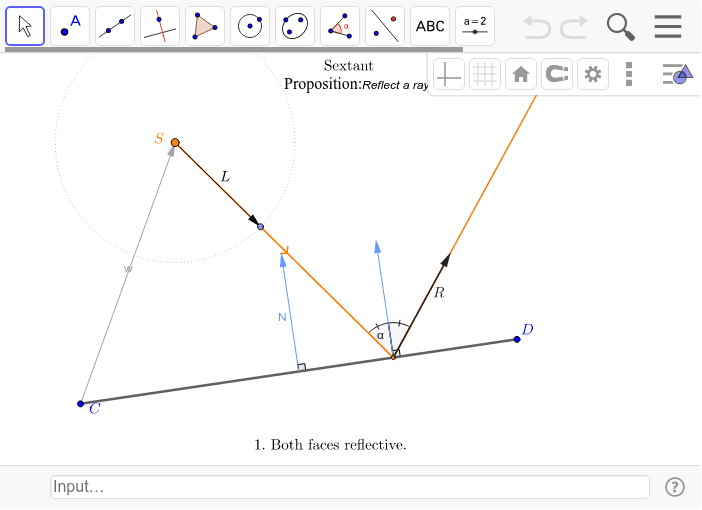
This example demonstrates the geometric construction of light reflection, involving core math concepts like the law of reflection, vector operations, and angle calculations. It utilizes GeoGebra commands/objects such as Circle, Point, Vector, Segment, Midpoint, Intersect, If, Translate, Angle, and Ray as outlined in the construction summary, making it suitable for high school physics optics teaching or mathematical geometric construction practice.
GeoGebra Commands & Parameters
Circle(S, 1) → cPoint(c) → AVector(S, A) → LVector(C, D) → vSegment(C, D) → CDMidpoint(CD) → EIntersect(Ray[S, L], CD) → X2Vector(C, S) → wIf(isect, C + (t * v), S) → XSegment(S, X) → l_1Vector(If[isect, (N * Rα), L]) → RTranslate(Vector[(σ * N)], X2) → n2Angle(n2, v) → βRay(X, R) → ResultantAngle(D, E, E + N) → ξAngle(X2 + n2, X2, X2 + R) → α''Angle(S, X2, X2 + n2) → α'
AI Drawing Prompt Reference
Draw a ray of light starting from point S, passing through points C and D. First, create a circle centered at S with radius 1 to find point A where the ray intersects the circle. Then, draw the vector from S to A to represent the light direction and the vector from C to D as the incident vector. Calculate the midpoint E of segment CD and the intersection point X2 of the ray with CD. Draw the vector from C to S to represent the normal direction. Based on the law of reflection, draw the reflected ray. Finally, calculate and display the relevant angles.
The prompt above was compiled from the original drawing commands and is for reference only.