
Reference Angle in the Second Quadrant Demo
Loading the math board and drawing, please wait…
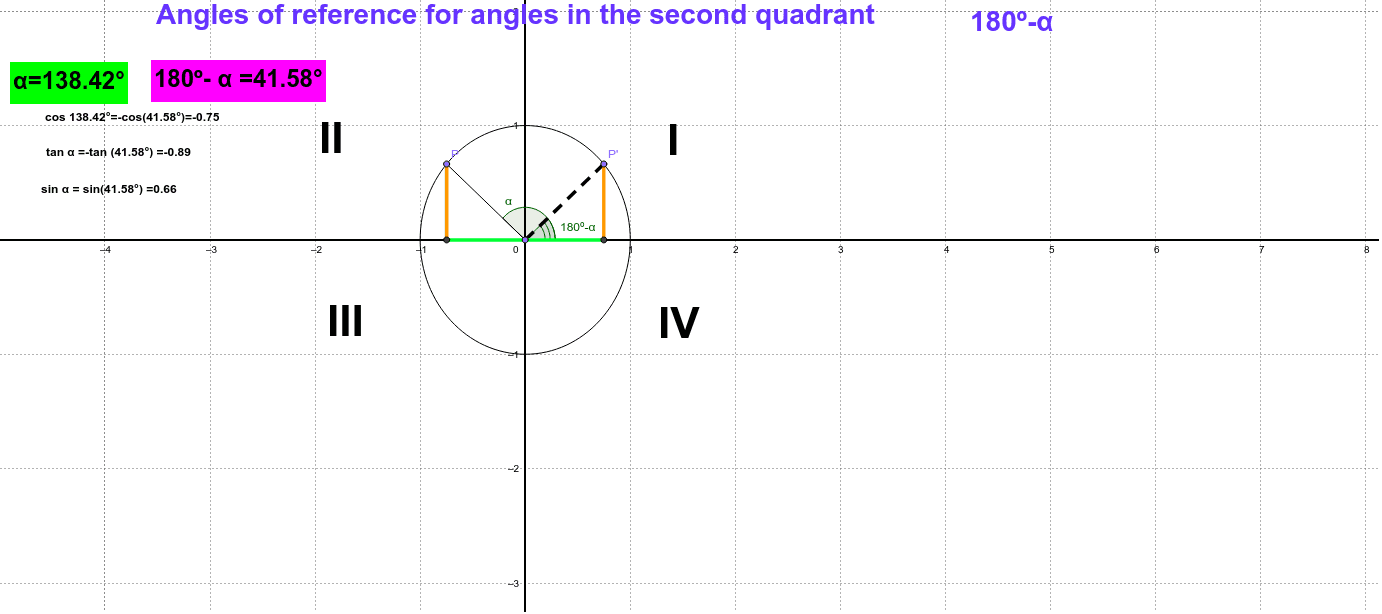
This example demonstrates how to find the reference angle by dragging an angle in the second quadrant and comparing the resulting coordinates. It covers core trigonometry concepts such as sine, cosine, tangent, the definition of a reference angle, coordinate relationships on the unit circle, and quadrant symmetry. The construction uses GeoGebra commands Intersect, Circle, Point, Segment, Angle, Mirror, and OrthogonalLine to create the unit circle, angle rays, mirrored points, and coordinate labels (objects A, c, P, α, P', A', β, etc.). It is suitable for high‑school trigonometry lessons, college‑prep review, and self‑study, serving as an interactive classroom tool or online learning resource.
GeoGebra Commands & Parameters
Intersect(xAxis, yAxis) → ACircle(A, 1) → cPoint(c) → PSegment(P, A) → aIntersect(c, xAxis, 1) → CAngle(C, A, P) → αMirror(P, yAxis) → P'Mirror(A, yAxis) → A'Segment(P', A') → a'OrthogonalLine(P, xAxis) → bOrthogonalLine(P', xAxis) → dIntersect(b, xAxis) → DIntersect(d, xAxis) → ESegment(D, P) → eSegment(D, A') → gSegment(E, P') → jPoint(a) → BSegment(E, B) → kAngle(E, B, P') → β
AI Drawing Prompt Reference
Please draw a diagram demonstrating the reference angle in the second quadrant. First, create a unit circle and select a point on it, connecting this point to the origin to form an angle. Reflect this angle across the y-axis to get the symmetric angle and point. Draw lines perpendicular to the x-axis and mark the relevant coordinate points and segments. Finally, label the original angle and its reference angle.
The prompt above was compiled from the original drawing commands and is for reference only.