
Rectangles in a Circle
Loading the math board and drawing, please wait…
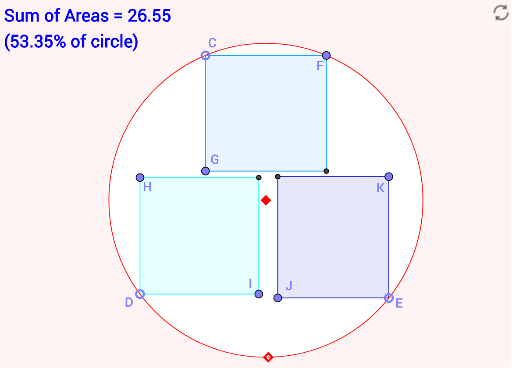
This example demonstrates constructing rectangles within a circle, involving concepts such as circles, rectangles, and trigonometry. Using GeoGebra commands like Circle, Intersect, and Polygon, you can dynamically adjust the size and position of the rectangles. Suitable for high school mathematics education and optimization problems.
GeoGebra Commands & Parameters
Circle(A, B) → cPoint(c) → CPoint(c) → DPoint(c) → EIntersect(c, y = y(C)) → C'_1, C'_2Point(Segment[C'_1, C'_2]) → FIntersect(c, x = x(C)) → C''_1, C''_2Point(Segment[C''_1, C''_2]) → GPolygon(C, F, FG, G) → poly1, f, g, h, icircrect(D, c) → poly2, H, I, J_1circrect(E, c) → poly3, K, J, MDefined(Intersect[poly1, poly2]) → r_1Defined(Intersect[poly1, poly3]) → r_2Defined(Intersect[poly3, poly2]) → r_3
AI Drawing Prompt Reference
Draw three rectangles inside a circle, with the vertices of the rectangles connected to form the rectangles. First, select three points on the circle, then draw rectangles centered at these points that intersect the circle, and finally connect the intersection points of these rectangles to form three rectangles.
The prompt above was compiled from the original drawing commands and is for reference only.