
Rectangle Triangle build upon c & a+b
Loading the math board and drawing, please wait…
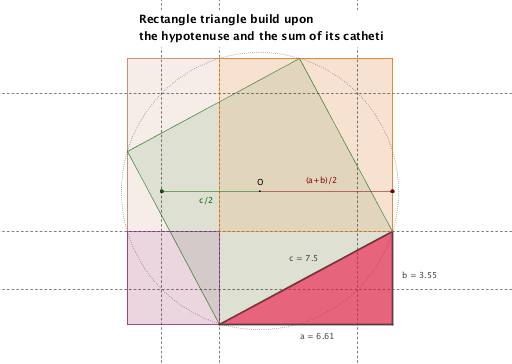
This example demonstrates how to construct a rectangle triangle based on side lengths c and a+b within a triangle. It involves core mathematical concepts like coordinate geometry, median line, orthocenter, quadratic equations, limits, and numbers. The construction uses commands and objects such as Point, Intersect, Line, Polygon, Circle, Tangent, Segment, OrthogonalLine in GeoGebra. Suitable for high school and above students to explore complex geometric relationships and constructions.
GeoGebra Commands & Parameters
Point(xAxis) → APoint(xAxis) → B_1Intersect(xAxis, yAxis) → OLine(A_1, xAxis) → fLine(A_2, yAxis) → gLine(A, yAxis) → hLine(A_3, xAxis) → iIntersect(g, i) → EIntersect(f, g) → FIntersect(f, h) → GIntersect(h, i) → HPolygon(E, F, G, H) → poly1, e, f_1, g_1, h_1Point(xAxis) → BCircle(O, B_1) → c_1Point(c_1) → CTangent(C, c_1) → j,Tangent(C_1, c_1) → k, a_1Intersect(j, k) → DCircle(O, D) → dIntersect(d, g_1, 2) → IIntersect(d, f_1, 2) → JIntersect(d, e, 2) → KIntersect(d, h_1, 2) → LPolygon(J, K, L, I) → poly2, j_1, k_1, l, i_1Segment(L, H) → aSegment(H, I) → bSegment(L, I) → cOrthogonalLine(L, h_1) → sOrthogonalLine(I, g_1) → tIntersect(s, t) → MIntersect(t, e) → NIntersect(e, h_1) → PPolygon(L, M, N, P) → poly3, l_1, m_1, n_1, p_1Intersect(s, f_1) → QIntersect(t, g_1) → RIntersect(f_1, g_1) → SPolygon(Q, M, R, S) → poly4, q_1, m_2, r, s_1Segment(B_1, O) → r_1Segment(O, A) → t_1Polygon(L, R, H) → poly5, h_2, l_2, r_2
AI Drawing Prompt Reference
Construct a coordinate system with x and y axes. Mark two points on the x-axis and draw perpendicular lines from these points to the y-axis and vice versa, forming a quadrilateral. Draw a circle centered at the origin with a radius equal to the distance from the origin to one point on the x-axis. From a point on this circle, draw tangents to the circle, and find their intersection. Use this intersection point to draw another circle, intersecting the sides of the quadrilateral. Connect various intersection points to form multiple triangles and quadrilaterals, highlighting complex geometric relationships.
The prompt above was compiled from the original drawing commands and is for reference only.