
Rectangle Template: Drag Vertices to Explore Properties
Loading the math board and drawing, please wait…
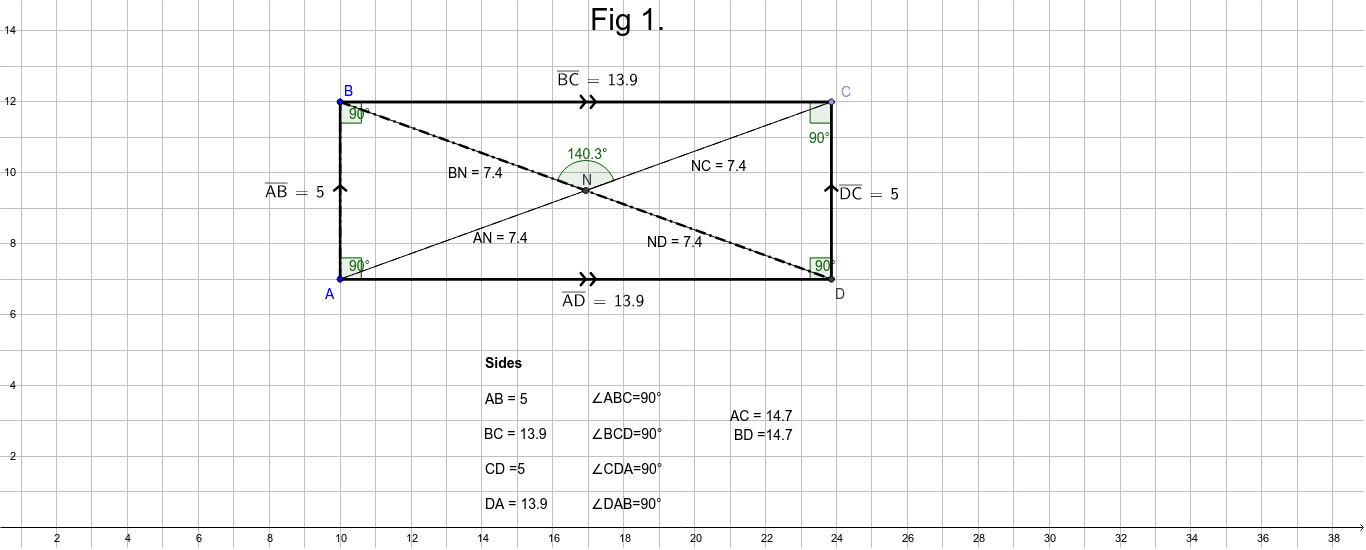
① This interactive template demonstrates the geometric construction of a rectangle and its fundamental properties through draggable vertices. ② Core math concepts include the definition of a rectangle (all interior angles are 90°), opposite sides parallel and equal, diagonal properties, and verification of side lengths via distance measurements. ③ Construction highlights: using GeoGebra commands such as Segment, OrthogonalLine, Line, Point, Intersect, Angle, and Distance, the template builds rectangle ABCD with auxiliary lines, measures side lengths (distanceAB, distanceBC, distanceCD, distanceAD) and angles (α, β, γ, δ, etc.), and includes multiple draggable points (A, B, C) for dynamic adjustment. ④ Suitable for middle school geometry lessons or self-study, helping students intuitively grasp rectangle properties and dynamic changes, and serving as a foundation for learning parallelograms, rhombi, and other special quadrilaterals.
GeoGebra Commands & Parameters
Segment(B, A) → aOrthogonalLine(A, a) → bLine(B, b) → cPoint(c) → COrthogonalLine(C, c) → dIntersect(b, d) → DSegment(B, C) → eSegment(D, A) → kAngle(A, B, C) → αAngle(B, A, D) → βAngle(A, D, C) → γAngle(B, C, D) → δDistance(A, B) → distanceABDistance(B, C) → distanceBCDistance(C, D) → distanceCDSegment(C, D) → fDistance(C, D) → gDistance(D, C) → distanceDCDistance(A, D) → distanceADSegment(E, F) → hLine(H, h) → iSegment(E, H) → jLine(F, j) → lIntersect(l, i) → GAngle(E, F, G) → εAngle(E, H, G) → ζAngle(F, E, H) → ηAngle(F, G, H) → θDistance(E, F) → distanceEFDistance(H, G) → distanceHGDistance(E, H) → distanceEHDistance(F, G) → distanceFGSegment(I, J) → pSegment(J, K) → qSegment(K, L) → rSegment(L, I) → sSegment(I, J) → p_1Segment(L, I) → s_1Segment(L, K) → r_1Segment(K, J) → q_1Angle(J, K, L) → κAngle(K, L, I) → λAngle(L, I, J) → μAngle(I, J, K) → νDistance(I, J) → distanceIJDistance(J, K) → distanceJKDistance(K, L) → distanceKLDistance(L, I) → distanceLISegment(B, D) → b_1Segment(A, C) → c_1Intersect(c_1, b_1) → NAngle(B, N, C) → ξSegment(A, B) → f_1Segment(A, B) → g_1Segment(D, C) → h_1Segment(B, C) → i_1Segment(B, C) → j_1Segment(A, D) → k_1Segment(A, N) → ANSegment(N, C) → NCSegment(B, N) → BNSegment(N, D) → ND
AI Drawing Prompt Reference
Draw a rectangle with draggable vertices to explore its properties. Show auxiliary lines, measure and label all side lengths and interior angles, ensuring each angle is 90 degrees. Also, measure and display the lengths of the diagonals and their intersection point, and observe how side lengths and diagonals change dynamically by dragging the vertices.
The prompt above was compiled from the original drawing commands and is for reference only.