
Rectangle, Rhombus, Square: Geometric Construction and Classification
Loading the math board and drawing, please wait…
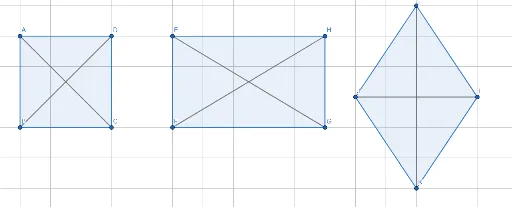
①This GeoGebra example dynamically demonstrates the construction of three special parallelograms—rectangle, rhombus, and square—highlighting their relationships and differences. ②Core mathematical concepts include properties of parallelograms, side-angle relationships, diagonal characteristics, and classification criteria for special quadrilaterals, along with geometric construction and transformations. ③Construction details: The Polygon command is used to create three quadrilaterals (q1, q2, q3) representing the rectangle, rhombus, and square; Segment commands construct sides and diagonals (e.g., a, b, c, d, e, f), while point objects (A through L) mark vertices; translation and vector tools illustrate connections between shapes. ④Suitable for middle and high school students learning plane geometry, this example serves as a visual aid for classroom demonstrations or self-study, helping learners understand the properties and criteria of special quadrilaterals, and can also be a reference for teachers creating instructional materials.
GeoGebra Commands & Parameters
Polygon(A, B, C, D) → q1, a, b, c, dPolygon(E, F, G, H) → q2, e, f, g, hPolygon(I, J, K, L) → q3, i, j, k, lSegment(A, C) → mSegment(B, D) → nSegment(I, K) → pSegment(J, L) → qSegment(F, H) → rSegment(E, G) → s
AI Drawing Prompt Reference
Draw three special parallelograms: a rectangle, a rhombus, and a square, each with four labeled vertices. For each quadrilateral, draw its four sides and both diagonals. Arrange the three shapes side by side with similar sizes. Use points to mark all vertices. The diagram should illustrate the classification of these quadrilaterals, emphasizing side-angle properties and diagonal characteristics.
The prompt above was compiled from the original drawing commands and is for reference only.