
Rectangle Properties by Kelly Curtis
Loading the math board and drawing, please wait…
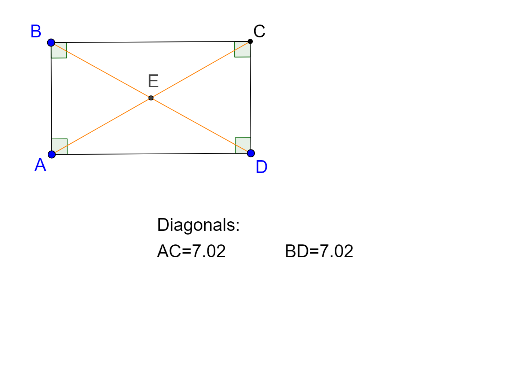
This example demonstrates the basic properties of a rectangle. Key mathematical concepts include the definition of a rectangle, diagonal properties, and angle relationships. Using GeoGebra commands such as Segment, OrthogonalLine, and Point, the construction process of a rectangle can be dynamically shown. Suitable for middle school and above students to learn geometric construction and related properties.
GeoGebra Commands & Parameters
Segment(B, A) → fOrthogonalLine(A, f) → gOrthogonalLine(B, f) → hPoint(g) → DOrthogonalLine(D, g) → iIntersect(h, i) → CSegment(B, C) → jSegment(C, D) → kSegment(D, A) → lAngle(D, A, B) → αAngle(A, B, C) → βAngle(B, C, D) → γAngle(C, D, A) → δSegment(B, D) → mSegment(C, A) → nIntersect(m, n) → ESegment(B, E) → pSegment(E, D) → qSegment(A, E) → rSegment(E, C) → s
AI Drawing Prompt Reference
Draw a rectangle with points A, B, C, and D, where AB and CD are parallel and equal, and AD and BC are parallel and equal. First, draw a line segment between points A and B, then draw two perpendicular lines from this segment to get points C and D. Next, draw the diagonals AC and BD, which intersect at point E and form four right angles. Measure and display the angles ∠DAB, ∠ABC, ∠BCD, and ∠CDA, as well as the lengths of diagonals AC and BD.
The prompt above was compiled from the original drawing commands and is for reference only.