
Rectangle Area with Fixed Perimeter
Loading the math board and drawing, please wait…
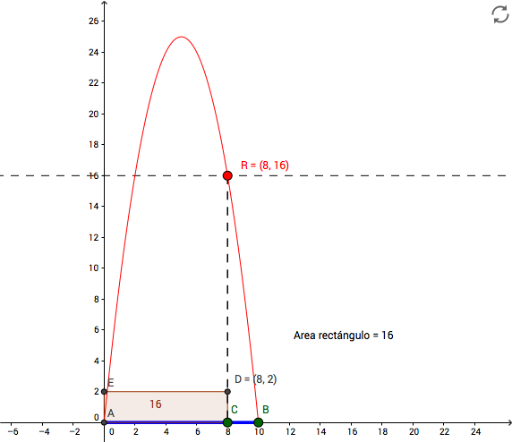
This example demonstrates how the area of a rectangle changes with its side lengths when the perimeter is fixed. Key math concepts include perimeter, area, coordinate geometry, and optimization. GeoGebra commands used are Intersect, Point, Segment, Distance, Circle, OrthogonalLine, Polygon, and Locus. Suitable for high school mathematics education, illustrating the application of parametric equations and loci in geometric problems.
GeoGebra Commands & Parameters
Intersect(xAxis, yAxis) → APoint(xAxis) → BSegment(A, B) → aPoint(a) → CSegment(A, B) → gDistance(A, B) → ABCircle(C, B) → cOrthogonalLine(C, a) → bIntersect(c, b, 2) → DOrthogonalLine(D, b) → dIntersect(yAxis, d) → EPolygon(A, C, D, E) → poly1, a_1, c_1, d_1, eLocus(R, C) → loc1OrthogonalLine(R, b) → fIntersect(f, yAxis) → FSegment(R, C) → i
AI Drawing Prompt Reference
Draw a coordinate plane with two perpendicular axes intersecting at a fixed point. Place a point on the horizontal axis and connect it to the fixed point to form a segment. Choose another point on this segment, and draw a circle centered at this point passing through the point on the horizontal axis. Construct a line through the segment point perpendicular to the segment, intersecting the circle at a new point. From this new point, draw another perpendicular line to meet the vertical axis. Connect the fixed point, the segment point, the circle intersection, and the vertical-axis point to form a rectangle. As the segment point moves along the segment, trace the rectangle's area to show a locus curve, and display the rectangle's height and base length.
The prompt above was compiled from the original drawing commands and is for reference only.