
GeoGebra Optimization Example
Loading the math board and drawing, please wait…
In collections
Realidades de GeoGebra
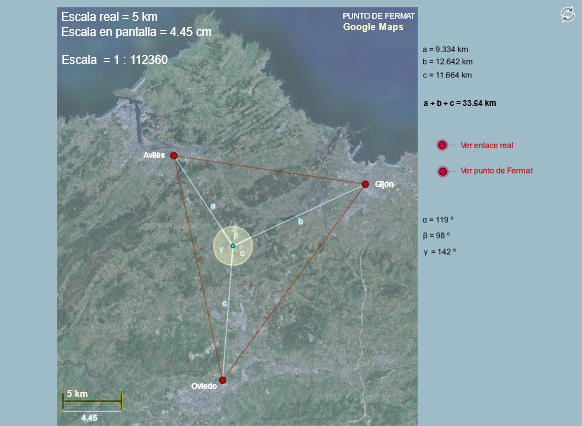
This example demonstrates the process of solving geometric optimization problems using GeoGebra. It involves core mathematical concepts such as angles, triangle constructions, optimization problems, trigonometry, geometric distribution, frequency distribution, and linear equations. The construction highlights commands and objects like Segment, Circle, Intersect, Polygon, Midpoint, and Angle. Suitable for high school and above learners to understand geometric optimization solutions and visualization.
GeoGebra Commands & Parameters
Segment(P, P_1) → cSegment(D, E) → m_2Segment(P, P_3) → bSegment(P, P_2) → aCircle(P_1, P_3 / verSolucion) → eCircle(P_3, P_1) → fIntersect(e, f, 2) → FPolygon(P_1, P_3, F) → Q, f_1, p_1, p_3Circle(P_2, P_3 / verSolucion) → dCircle(P_3, P_2) → gIntersect(d, g, 1) → GPolygon(P_3, P_2, G) → R, g_1, p_2, p_4Circle(P_1, P_2 / verSolucion) → hCircle(P_2, P_1) → kIntersect(h, k, 1) → HPolygon(P_2, H, P_1) → S, p_5, p_6, h_1Midpoint(G, P_3) → KMidpoint(P_2, G) → JMidpoint(P_2, H) → LMidpoint(H, P_1) → MMidpoint(P_3, F) → NMidpoint(F, P_1) → OSegment(H, P_3) → iSegment(G, P_1) → jSegment(F, P_2) → lIntersect(j, l) → TAngle(P_1, P, P_3) → αAngle(P_3, P, P_2) → βAngle(P_2, P, P_1) → γSegment(I_1, U) → mSegment(V, W) → nSegment(Z, A_1) → pSegment(A_1, B_1) → rSegment(U, V) → tSegment(W, Z) → d_1Segment(B_1, P_3) → qSegment(I_1, C_1) → e_1Segment(D_1, E_1) → i_1Segment(F_1, G_1) → j_1Segment(H_1, J_1) → k_1Segment(K_1, P_2) → l_1Segment(I_1, L_1) → n_1Segment(W_1, P_1) → d_2Segment(K_1, J_1) → e_2Segment(H_1, G_1) → f_2Segment(F_1, E_1) → g_2Segment(D_1, C_1) → h_2Segment(L_1, M_1) → i_2Segment(W_1, N_1) → q_1Segment(N_1, O_1) → r_1Segment(O_1, Q_1) → s_1Segment(Q_1, R_1) → t_1Segment(R_1, S_1) → a_2Segment(S_1, T_1) → b_2Segment(M_1, T_1) → c_2
AI Drawing Prompt Reference
Draw a triangle with three vertices. Construct an equilateral triangle outward on each side of the original triangle, creating three external equilateral triangles. Connect each outer vertex to the midpoint of the opposite side of the original triangle; these three segments intersect at a common point. Then add a series of auxiliary segments around the figure, forming a complex grid of lines and polygons. Label the three interior angles of the original triangle. The final diagram shows a symmetric geometric optimization layout with midpoints, intersections, and multiple polygonal regions.
The prompt above was compiled from the original drawing commands and is for reference only.