
Rectangle Action! Interactive Geometry Exploration
Loading the math board and drawing, please wait…
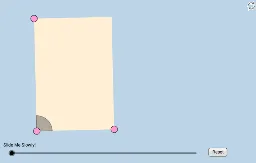
This GeoGebra applet actively engages students in exploring rectangles and their properties through an informal transformational geometry approach, without relying on specific segment lengths or angle measures. It demonstrates how rectangles behave under various transformations such as translation, rotation, and dilation, while highlighting key concepts like angles, intersections, and symmetry. The construction utilizes a wide range of GeoGebra commands including Segment, Slope, OrthogonalLine, Point, Ray, Line, Intersect, Midpoint, Circle, Dilate, Vector, CircleSector, Translate, Rotate, Polygon, and Angle, creating numerous objects (points A, B, C, D, E, F, and transformed versions like A', B', p', etc.) to illustrate dynamic relationships. This applet is ideal for middle and high school geometry classes, serving as a hands-on tool for teachers to demonstrate transformations or for students to explore independently, fostering spatial reasoning and a deeper understanding of geometric transformations.
GeoGebra Commands & Parameters
Segment(A, B) → aSlope(a) → cOrthogonalLine(A, a) → ePoint(e) → CRay(A, C) → dPoint(d) → DSegment(A, D) → fLine(D, a) → gLine(B, f) → hIntersect(g, h) → ESegment(D, E) → iSegment(E, B) → jMidpoint(A, E) → FCircle(A, (0.2 * Min[f, i])) → kIntersect(k, f) → G,Intersect(k, a, 1) → HDilate(A, If[0 < l ≤ 1, 1 - l, 0], B) → A'Vector(A, A') → uCircleSector(A, H, G) → pTranslate(p, u) → p'Rotate(p', If[1 < l ≤ 2, ((l - 1) * π / 2), 1.5707963267948966], B) → p''Dilate(B, If[2 < l ≤ 3, 3 - l, 0], E) → B'Vector(B, B') → vTranslate(p'', v) → p'''Rotate(p''', If[3 < l ≤ 4, ((l - 3) * π / 2), 1.5707963267948966], E) → qDilate(E, If[4 < l ≤ 5, 5 - l, 0], D) → E'Vector(E, E') → wTranslate(q, w) → q'Rotate(q', If[5 < l ≤ 6, ((l - 5) * π / 2), 1.5707963267948966], D) → q''Dilate(D, If[6 < l ≤ 7, 7 - l, 0], F) → D'Vector(D, D') → mSegment(D, D') → nDilate(F, If[7 < l ≤ 8, 8 - l, 0], B) → F'Segment(F, F') → rDilate(A, If[8 < l ≤ 9, 9 - l, 0], F) → A'_1Segment(A, A'_1) → sDilate(F, If[9 < l ≤ 10, 10 - l, 0], E) → F'_1Segment(F, F'_1) → tPolygon(A, B, E, D) → poly1, a_1, b_1, e_1, d_1Angle(E, F, D) → αAngle(B, A, F) → γAngle(F, A, D) → δRotate(F, If[10 < l ≤ 11, ((l - 10) * α), α], F) → F'_2Rotate(F'_1, If[10 < l ≤ 11, ((l - 10) * α), α], F) → ISegment(F'_2, I) → t'Rotate(F'_2, If[11 < l ≤ 12, ((l - 11) * (π - α)), π - α], F) → JRotate(I, If[11 < l ≤ 12, ((l - 11) * (π - α)), π - α], F) → I'Segment(J, I') → t''Rotate(J, If[12 < l ≤ 13, ((l - 12) * α), α], F) → J'Rotate(I', If[12 < l ≤ 13, ((l - 12) * α), α], F) → I''Segment(J', I'') → t'''Segment(A, F) → c_1Intersect(k, c_1) → K,CircleSector(A, H, K) → f_1CircleSector(A, K, G) → g_1Dilate(A, If[16 < l ≤ 17, 17 - l, 0], E) → A'_2Dilate(A, If[16 < l ≤ 17, 17 - l, 0], B) → A'_3Dilate(A, If[16 < l ≤ 17, 17 - l, 0], D) → A'_4Vector(A, A'_3) → u_1Vector(A, A'_2) → v_1Vector(A, A'_4) → w_1Translate(f_1, u_1) → h_1Translate(f_1, v_1) → k_1Translate(f_1, w_1) → p_1Rotate(h_1, If[17 < l ≤ 18, ((l - 17) * (π / 2 + δ)), π / 2 + δ], B) → q_1Rotate(p_1, If[17 < l ≤ 18, ((l - 17) * ((3 * π / 2) + δ)), (3 * π / 2) + δ], D) → r_1Rotate(k_1, If[17 < l ≤ 18, ((l - 17) * π), 3.141592653589793], E) → s_1Dilate(A, If[18 < l ≤ 19, 19 - l, 0], E) → A'_5Dilate(A, If[18 < l ≤ 19, 19 - l, 0], D) → A'_6Dilate(A, If[18 < l ≤ 19, 19 - l, 0], B) → A'_7Vector(A, A'_7) → i_1Vector(A, A'_5) → j_1Vector(A, A'_6) → l_1Translate(g_1, l_1) → t_1Translate(g_1, j_1) → c_2Translate(g_1, i_1) → d_2Rotate(d_2, If[19 < l ≤ 20, ((l - 19) * δ), δ], B) → e_2Rotate(c_2, If[19 < l ≤ 20, ((-(l - 19)) * π), -3.141592653589793], E) → f_2Rotate(t_1, If[19 < l ≤ 20, ((l - 19) * (π + δ)), π + δ], D) → g_2
AI Drawing Prompt Reference
Draw a rectangle ABCD and perform rotation and scaling transformations around point B to generate a new rectangle A'B'C'D'. First, connect points A and B, calculate its slope, construct a line perpendicular to AB and find point C on this line. Then, construct a ray through points A and C, and find its intersection with point D. Next, rotate and scale rectangle ABCD around point B to generate a new rectangle A'B'C'D', and connect the relevant points to form new segments and polygons.
The prompt above was compiled from the original drawing commands and is for reference only.