
Re-parametrization of Vector Functions and Their Derivatives
Loading the math board and drawing, please wait…
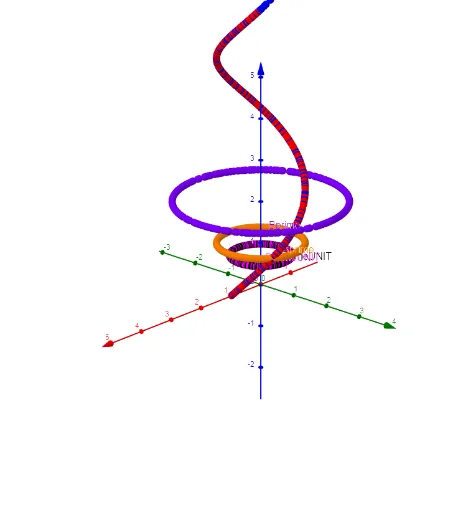
This GeoGebra example demonstrates the re-parametrization of vector functions and the geometric interpretation of their derivatives. By adjusting the slider parameter t, users can observe how points A and B move along the curve defined by vector functions, while viewing the corresponding tangent vectors (derivatives) at each position. The construction includes: parameter t for animation control; points A and B representing positions on the curve; Aprime and Bprime showing the derivative (velocity) vectors; and AprimeUNIT and BprimeUNIT displaying the unit tangent vectors. This visualization is ideal for college students studying vector calculus, helping them understand the differential geometry concepts of vector-valued functions including tangent vectors, unit normals, and arc-length parametrization.
GeoGebra Commands & Parameters
Numeric t(5.9)(cos(t), sin(t), t)(cos((2 * t)), sin((2 * t)), (2 * t))((-sin(t)), cos(t), 1)((-2 * sin((2 * t))), (2 * cos((2 * t))), 2)((-1 / sqrt(2) * sin((2 * t))), (1 / sqrt(2) * cos((2 * t))), 1 / sqrt(2))((-1 / sqrt(2) * sin(t)), (1 / sqrt(2) * cos(t)), 1 / sqrt(2))
AI Drawing Prompt Reference
Visualize a parametric curve where adjusting parameter t shows two points A and B moving along the curve, with their respective tangent vectors (derivatives) and unit tangent vectors displayed. The curve is defined by two vector functions, one varying with t and the other with 2t. Tangent vectors indicate the direction of velocity, while unit tangent vectors show directions in unit length. The animation demonstrates how changes in t affect the positions and directions of the points and their tangent vectors, illustrating concepts in vector calculus and differential geometry.
The prompt above was compiled from the original drawing commands and is for reference only.