
Randomized Integer Addition Practice with Conditional Feedback
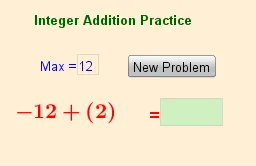
Loading the math board and drawing, please wait…
This example demonstrates an interactive GeoGebra setup for practicing integer addition by randomly generating problems and then using conditional logic to check the learner’s input and provide feedback. The key mathematical ideas are integer addition, computing the correct result, and comparing a student’s answer with the expected answer using if/conditional statements. Construction-wise, Random is used to produce integer addends within a chosen range, Textfield collects the student’s response, and If determines whether the input matches the target and controls the displayed message/state. The objects max and min define the bounds for random generation, a and b represent the addends, ans and ans_student store the correct answer and the student’s entry, while empty, inputBox, maxBox, button1, text1/text2, and textcontrol support the user interface and conditional display behavior. Suitable for middle school learners and classroom drills focused on integer computation, or for self-paced practice/quiz activities.
GeoGebra Commands & Parameters
Random(min, max) → aRandom(min, max) → bTextfield(empty) → inputBoxTextfield(max) → maxBoxIf(ans_{student} ≟ ans, "correct", "Sorry: " + ans) → textcontrol
AI Drawing Prompt Reference
Design an interactive math practice interface with two randomly generated integers as addends, a text box for user input, and a dynamic text that provides feedback based on the comparison between the user's answer and the correct answer. Include a slider to set the range for random numbers and conditional logic to dynamically display messages indicating whether the user's answer is correct or not.
The prompt above was compiled from the original drawing commands and is for reference only.