
Random Polynomial Self-Check
Loading the math board and drawing, please wait…
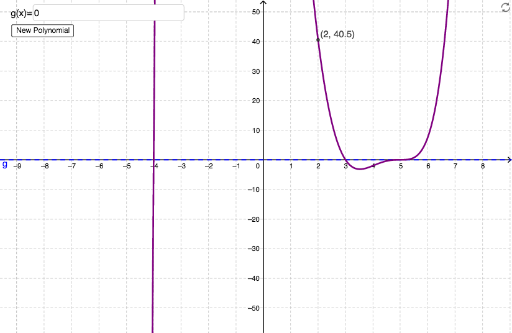
This example demonstrates how to determine the equation of a randomly generated polynomial function with at most three zeros and at most degree 6, given its graph. Key math concepts include polynomial functions, function graph recognition, and equation solving. GeoGebra commands and objects used are Random, RandomElement, Textfield, and elements like g, a_1, r4, a, r3, r1, r2, b, c, d, button1, f, text1, A, inputBox1, samegraph, text2, B, C, D, E, cantseeyint, oneint, negtwoint, twoint, origin, negoneint. Suitable for high school mathematics teaching, focusing on the relationship between function graphs and equations.
GeoGebra Commands & Parameters
Random(-5, 5) → r4RandomElement({-1, 1, -0.5, 0.5, 0.25, -0.25}) → aRandom(-5, 5) → r3Random(-5, 5) → r1Random(-5, 5) → r2RandomElement({0, 1, 2, 3}) → bRandomElement({0, 1, 2}) → cRandomElement({0, 1}) → dTextfield(g) → inputBox1
AI Drawing Prompt Reference
Draw a random polynomial function graph with at most three zeros and degree up to six. Include a curve representing the polynomial and some points to indicate the zeros. Ensure the curve shape matches polynomial function characteristics and keep the graph clear and simple.
The prompt above was compiled from the original drawing commands and is for reference only.