
Random Integer Addition & Subtraction with Number-Line Support
Loading the math board and drawing, please wait…
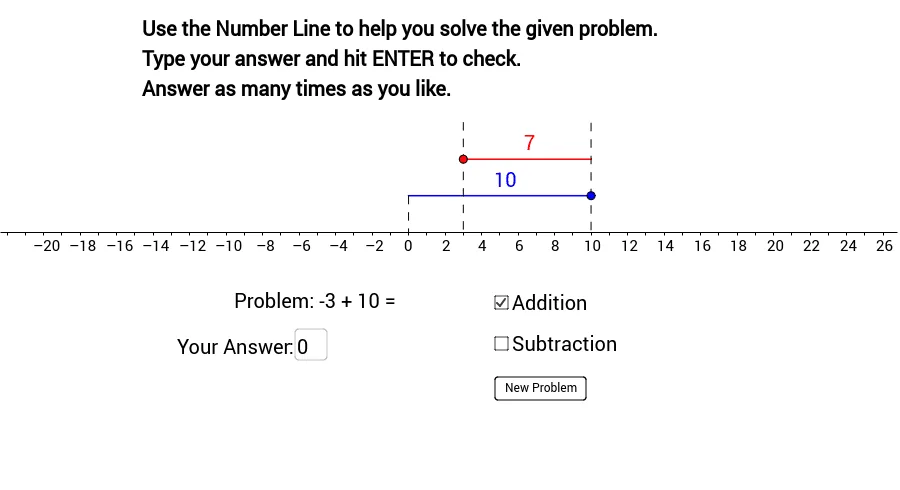
This GeoGebra applet generates random integer addition and subtraction problems (integers from −10 to 10) and supports solving them visually using a number-line tool. It helps learners connect the sign and direction of operations to the corresponding movement on the line, clarifying how the result changes when adding a positive/negative number or subtracting another integer. Key math concepts include integer arithmetic (addition/subtraction), signed numbers, and number-line representation of real numbers (restricted to integers here). Construction-wise, it uses geometry-building commands such as Point, OrthogonalLine, Intersect, Segment, Textfield, If, and Line to create and relate points and lines (objects like a, b, A, B, c, C, d, D, e, and related variables), draw number-line segments representing the displacement/magnitude, and label the exercise and feedback. Interactive components (e.g., input fields and buttons) along with conditional logic (If) check user answers and display correct/incorrect outcomes tied to Addition and Subtraction modes. Suitable for elementary-to-middle-school students practicing integers and for classroom or self-study activities focused on number-line reasoning and sign understanding.
GeoGebra Commands & Parameters
Point(b) → BPoint(a) → AOrthogonalLine(A, b) → cIntersect(b, c) → CSegment(C, B) → dPoint(a) → ESegment(A, E) → eTextfield(answer) → inputBox1If(g ∧ v1 + v2 ≟ answer, true, false) → AddCorrIf(g ∧ (v1 + v2 ≠ answer), true, false) → AddInCorrIf(h ∧ v1 - v2 ≟ answer, true, false) → SubCorrIf(h ∧ (v1 - v2 ≠ answer), true, false) → SubInCorrLine(A, C) → iPoint(i) → FPoint(i) → GSegment(F, G) → jSegment(I, H) → kOrthogonalLine(B, xAxis) → lIntersect(l, xAxis) → JPoint(l) → KSegment(K, J) → m
AI Drawing Prompt Reference
Draw a number line from -10 to 10. Mark two points A and B on the number line, with A to the left of B. Create a vertical line c through A and B, intersecting the number line at point C. Connect C and B to form segment d. Mark another point E on the number line, and connect A and E to form segment e. Create a text input box for the user to enter their answer. Based on the user's answer, determine if the addition or subtraction is correct and display the corresponding correct or incorrect message. Create a line i through A and C, mark two points F and G on line i, and connect F and G to form segment j. Connect two points J and K on the number line to form segment m.
The prompt above was compiled from the original drawing commands and is for reference only.