
Raising Powers to Powers
Loading the math board and drawing, please wait…
In collections
Rechnen mit Potenzen
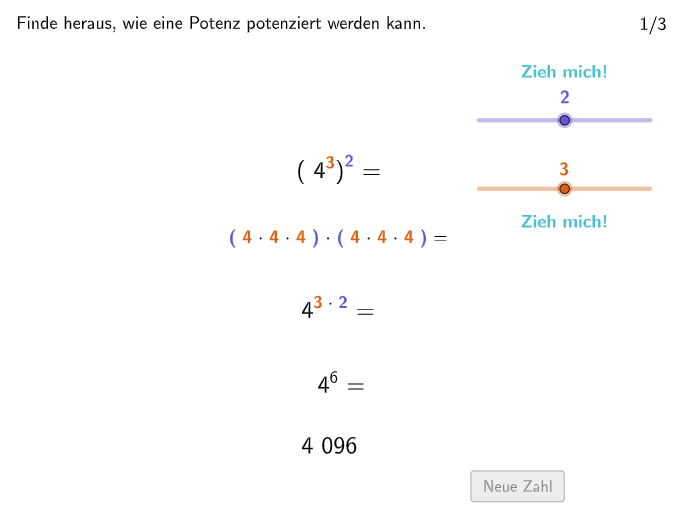
This example demonstrates the rules for raising powers to powers. It involves core math concepts like exponentiation rules and operations. Constructed using GeoGebra commands and objects such as Textfield, Shuffle, Join, Text, Segment, SelectedIndex for interactive questions and dynamic text display. Suitable for 7th-8th grade students learning and practicing exponentiation rules.
GeoGebra Commands & Parameters
Textfield(input1) → InputBox1Textfield(input2) → InputBox2Textfield(input3) → InputBox3Textfield(input4) → InputBox4Shuffle({1, 2, 3, 4, 5, 6, 7, 8, 9, 10} \ {oldnum, oldnum2}) → RandomList, {8, 9, 10, 6, 4, 1, 5, 2}Join({{4}, RandomList}) → NotSoRandomListText(Text12, F, false, true, 0, 0) → Text13Text(If[expo1 ≟ 1, TxtExpo11, expo1 ≟ 2, TxtExpo12, expo1 ≟ 3, TxtExpo13, expo1 ≟ 4, TxtExpo14, TxtExpo15], A, false, true, 0, 0) → Text4Text(Text6, B, false, true, 0, 0) → Text5Text(Text3, G, false, true, 0, 0) → Text7Segment(H, H + (0, lengthArrow)) → fSegment(I, I + (0, (-lengthArrow))) → gText(Text14, J, false, true, 0, 0) → Text15SelectedIndex(DD1) → index1
AI Drawing Prompt Reference
Create a dynamic coordinate-plane worksheet focused on exponentiation rules. Include four input fields for exponent-related values, and display a set of randomly chosen numbers as answer options. Add several text labels that show rule-based exponent expressions chosen according to which exponent value is selected. Draw two short arrow-like line segments: one extending upward from a point and another extending downward from another point, with explanatory text placed near them. Provide an option/index selector so the displayed expression updates based on the selected index.
The prompt above was compiled from the original drawing commands and is for reference only.