
Radioactive Ball: Animated Origami Model
Loading the math board and drawing, please wait…
In collections
Action Modular Origami
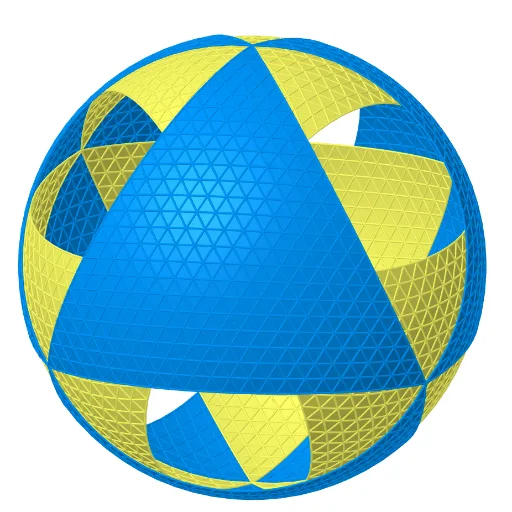
This example demonstrates a dynamic 3D animation of a 'Radioactive Ball' folded from paper, based on the book 'Action Modular Origami'. The core mathematical concepts involve spheres, icosahedra, tetrahedra, intersections of planes and circles, similarity transformations, rotations, translations, scaling, and differential equations for the dynamic behavior. Construction highlights: using GeoGebra commands such as Point, Intersect, Tetrahedron, Plane, Circle, Center, Midpoint, Sphere, IntersectPath, Line, Rotate, Polygon, Icosahedron, OrthogonalLine, Sequence, TrianglePointsFrequency2, Flatten, CircumcircleArc, Translate, Dilate, and Mirror, the model builds multiple faces, edges, vertices, auxiliary circles, and segments, with animation driven by sliders or sequences. Suitable for high school and above, this example is ideal for teaching solid geometry, transformation geometry, and origami mathematics, as well as for mathematical modeling and dynamic visualization.
GeoGebra Commands & Parameters
Point(xAxis) → BIntersect(yAxis, xAxis) → APoint(Circle[Midpoint[A, B], (Distance[A, B] * sqrt(3) / 2), Segment[A, B]]) → CTetrahedron(A, B, C) → a, D, edgeCD, edgeBD, faceABC, faceACD, faceABD, faceBCD, edgeAC, edgeAB, edgeBC, edgeADPlane(C, D, A) → jCircle(A, B, C) → cCenter(c) → EMidpoint(D, E) → FMidpoint(F, E) → OOSphere(OO, B) → bIntersectPath(j, b) → qLine(C, OO) → lRotate(q, 240°, l) → q'_1Intersect(q, q'_1, 2) → LPoint(l) → KPlane(K, L, A) → mIntersectPath(m, b) → rPoint(r) → MRotate(M, 240°, l) → M'_1Midpoint(M, M'_1) → J_1Rotate(M, 120°, l) → M'Polygon(M, M', M'_1) → poly1, m'_1, m_1, m'Icosahedron(M'_1, M', M) → c_1, A_1, face1, face2, face8, face7, face6, face9, face10, face3, face4, face5, B_1, face13, face14, face19, face16, face18, face20, face17, face15, face12, face11, C_1, edge1, edge5, edgeMM', edge7, edge3, edge8, edge18, edge6, edge12, edge9, D_1, edge11, edge13, edge10, edge15, edge2, edge4, edge16, edge19, edge17, edge24, E_1, edge25, edge26, edge29, edge20, edge27, edge23, edge28, edge22, edge21, edge14, F_1, G_1, H_1, I_1Midpoint(F_1, C_1) → N_1Line(M, N_1) → f_2Midpoint(F_1, M) → M_1Line(C_1, M_1) → g_2Intersect(f_2, g_2) → O_1Midpoint(C_1, M'_1) → K_1Line(M, K_1) → d_1Line(C_1, J_1) → e_1Intersect(d_1, e_1) → L_1Line(M'_1, L_1) → j_3Intersect(edge3, j_3) → C_2Polygon(O_1, C_2, M) → poly6, m_3, o_2, c_3Polygon(M, C_2, M'_1) → poly2, s_1, t_1, b_1Plane(MM, xOyPlane) → o_1Line(E, D) → fIntersect(f, o_1) → B_2Intersect(l, poly1) → GRotate(MM, (-(60°)), G, poly1) → MM'_2Plane(OO, D, M) → uOrthogonalLine(M, f, u) → k_1Intersect(f, k_1) → VRotate(MM, 240°, l) → MM'_1Rotate(MM, 120°, l) → MM'Polygon(MM, MM', MM'_1) → poly11, mm'_1, mm, mm'Rotate(MM, 60°, G, poly1) → MM'_5Polygon(MM, MM'_5, 6, poly11) → poly33, d_2, A_2, e_2, f_3, g_3, h_3, i_3, V_1, W_1, Z_1Rotate(M, 60°, G, poly1) → M'_5Polygon(B_2, MM'_2, MM) → poly4, l_1, p_1, q_1Polygon(M, M'_5, 6, poly1) → poly3, t, S, f_1, g_1, h_1, i_1, j_1, P, Q, RMidpoint(B_1, E_1) → T_1Line(T_1, M') → a_2Line(F_1, A_1) → p_2Line(C_1, E_1) → n_2OrthogonalLine(O_1, face5) → j_2Midpoint(M', E_1) → Q_1Line(Q_1, B_1) → b_2Intersect(b_2, a_2) → U_1OrthogonalLine(U_1, face10) → c_2Polygon(M, L_1, C_1) → poly5, k_2, l_2, m_2Sequence(Rotate[{poly1, poly2, poly6}, (n * 120°), l], n, 0, 2, 1) → listIcosFace1Rotate(listIcosFace1, 1200°, c_2) → listIcosFace4Rotate(listIcosFace1, 240°, j_2) → listIcosFace3Rotate(listIcosFace3, (-(144°)), n_2) → listIcosFace1''Rotate(listIcosFace1'', (-(((3 * 72))°)), p_2) → listIcosFace2Line(Q_1, A_1) → r_2Midpoint(E_1, A_1) → P_1Line(P_1, M') → s_2Intersect(r_2, s_2) → S_1OrthogonalLine(S_1, face9) → t_2Rotate(listIcosFace1, 120°, t_2) → listIcosFace1'_3Rotate(M, 120°, f) → M'_4Point(f) → OPlane(B, OO, D) → ePlane(A, OO, B) → dIntersectPath(e, d) → iRotate(B, 60°, A) → B'Plane(A, B, B') → oTrianglePointsFrequency2(A, B, n, o) → listPointsFlatSequence(Sequence[ProjectPointOnSphere[Element[Element[listPointsFlat, i], j], O, b], j, 1, Length[Element[listPointsFlat, i]]], i, 1, n + 1) → listPointsSequence(Sequence[Polygon[Element[Element[listPoints, j], i], Element[Element[listPoints, j], i + 1], Element[Element[listPoints, j + 1], i]], i, 1, n - j + 1], j, 1, n) → listPolyUpProjSequence(Sequence[Polygon[Element[Element[listPoints, j], i], Element[Element[listPoints, j], i + 1], Element[Element[listPoints, j - 1], i + 1]], i, 1, n - j + 1], j, 2, n) → listPolyDownProjFlatten({listPolyUpProj, listPolyDownProj}) → listPolyProjRotate(listFace, 240°, f) → listFace''Rotate(listFace'', 120°, l) → listFace'''Rotate(listFace, 120°, i) → listFace'Rotate(listFace', 240°, f) → listFace''_1CircumcircleArc(L, M, A) → arc1Rotate(arc1, 240°, l) → arc3Rotate(arc1, 120°, l) → arc2Intersect(zAxis, c) → H,Plane(D, OO, A) → gIntersect(edgeBD, c) → I,IntersectPath(g, b) → hIntersectPath(e, b) → kIntersectPath(d, b) → pIntersect(h, p, 1) → JRotate(q, 120°, l) → q'Midpoint(A, L) → NTranslate({listFace''_1, listFace', listFace'', listFace'''}, Vector[A, A]) → listPoly1Line(N, OO) → n_1Dilate(Rotate[listPoly1, (-(90°)), n_1], dil, OO) → listPoly1'Plane(OO, xOyPlane) → sRotate(M, (-(60°)), G, poly1) → M'_3Intersect(f, arc1) → T,Sequence(Rotate[{poly33, poly4}, (n * 120°), l], n, 0, 2, 1) → listTruncOctaFace1Intersect(arc1, arc3, 2) → USequence(Rotate[listTruncOctaFace1, (n * 120°), i], n, 0, 2, 1) → listTruncOctaFace11Rotate(listTruncOctaFace1, 240°, f) → listTruncOctaFace3Translate({listTruncOctaFace11, listTruncOctaFace3}, Vector[A, A]) → listTruncOcta1Dilate(Rotate[listTruncOcta1, (-(90°)), n_1], dil, OO) → listTruncOcta1'Plane(C_1, E_1, B_1) → vMirror(listIcosFace1, v) → listIcosFace1'Line(OO, N) → r_1Intersect(i, f) → WPoint(listIcosFace1) → ZTranslate({listIcosFace4, listIcosFace1, listIcosFace2, listIcosFace3}, Vector[A, A]) → listIcos1Plane(B_1, D_1, A_1) → wMirror(listIcosFace1, w) → listIcosFace1'_1Plane(S, OO, R) → a_1OrthogonalLine(O_1, k_1, space) → h_2Line(O_1, OO) → i_2Line(I_1, M') → q_2Rotate(listIcosFace2, (-(144°)), n_2) → list1Intersect(edge11, s_2) → R_1Mirror(listIcosFace1, w) → listIcosFace1'_5Rotate(MM, 60°, G, poly1) → M'_2Rotate(MM, 120°, G, poly1) → MM'_3Line(K_1, OO) → k_3Line(G, OO) → l_3Midpoint(A_1, M'_1) → D_2Midpoint(A_1, D_1) → E_2Line(D_2, D_1) → n_3Line(E_2, M'_1) → p_3Intersect(n_3, p_3) → F_2OrthogonalLine(F_2, face7) → q_3Plane(C_1, M'_1, E_1) → u_1Mirror(listIcosFace1, u_1) → listIcosFace11Rotate(listIcosFace11, 240°, j_2) → listIcosFace31Rotate(listIcosFace11, 120°, c_2) → listIcosFace41Dilate({Sequence[Rotate[listIcosFace11, (n * 120°), l_3], n, 0, 2, 1], listIcosFace41}, dil, OO) → listIcos2
AI Drawing Prompt Reference
Create a dynamic 3D origami model of a radioactive ball. Start with a regular tetrahedron, then construct its circumcircle and center. Use the center as the sphere center and a vertex as radius to draw a sphere. Intersect the sphere with a face plane to get a circle, pick a point on it, and rotate it by 120 and 240 degrees around an axis to form a triangle. Build an icosahedron on this triangle, then find internal intersection points by connecting midpoints and lines. Use these points to form additional polygons, and add auxiliary planes and rotation axes. Animate the model with sliders to show the folding motion.
The prompt above was compiled from the original drawing commands and is for reference only.