
Radians and Degrees Conversion
Loading the math board and drawing, please wait…
In collections
geometriadinamica.es
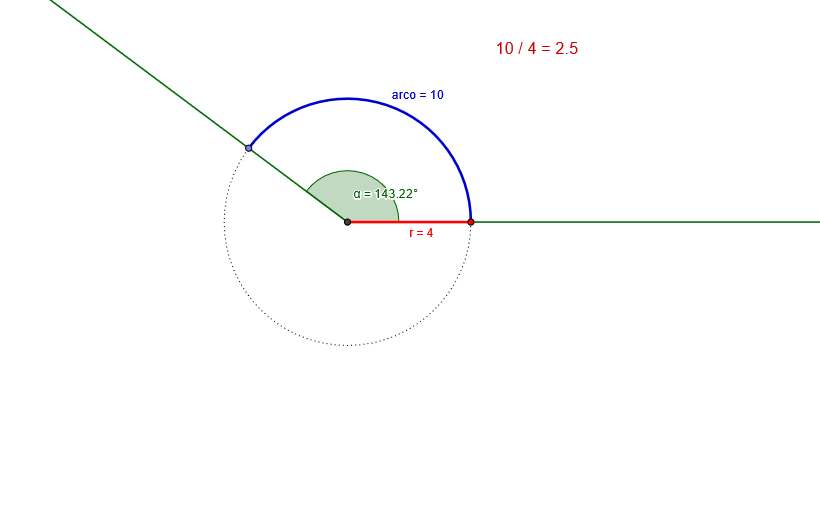
This example demonstrates the conversion and visualization of radians and degrees in GeoGebra. It involves core mathematical concepts such as angles, radians, pi, and trigonometric functions. The construction uses GeoGebra commands and objects like Intersect (intersection), Point (point), Ray (ray), Circle (circle), Angle (angle), Segment (segment), and CircleArc (arc). It is suitable for high school mathematics teaching, helping students understand the relationship between angles and radians and their practical applications.
GeoGebra Commands & Parameters
Intersect(xAxis, yAxis) → OPoint(xAxis) → ARay(O, A) → aPoint(a) → BCircle(O, B) → cPoint(c) → CRay(O, C) → bAngle(B, O, C) → αSegment(O, B) → rCircleArc(O, B, C) → arco
AI Drawing Prompt Reference
Draw a graph in a Cartesian coordinate system with the origin O, point A, and point B. Draw ray a from O through A, and ray b from O through C. Construct a circle c with center O and radius B. Draw line segment r from O to B. Draw arc arco from O to B through C. Define angle α by points B, O, and C. Ensure the graph clearly shows the relationship between angles, circles, and arcs to help understand the conversion between radians and degrees.
The prompt above was compiled from the original drawing commands and is for reference only.