
Q2 Math Example
Loading the math board and drawing, please wait…
In collections
Open Middle: Distance and Midpoint Exercise
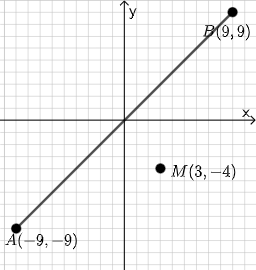
This example demonstrates geometric constructions and calculations based on points, lines, and polygons. It involves core math concepts like arithmetic, area, Pythagorean theorem, functions, and quadrilaterals. GeoGebra commands and objects used include PointIn, Segment, SurdText, Textfield, Point, Mode, Intersect, Polygon, Midpoint, If, etc. Suitable for middle school and above mathematics teaching and geometric construction learning.
GeoGebra Commands & Parameters
PointIn(e) → APointIn(e) → BSegment(A, B) → fSurdText(f) → text1Textfield(j) → InputBox1Textfield(k) → InputBox2Point(Circle[A, sqrt((100 * j) + (10 * k) + o)]) → CSegment(A, C) → lMode(l1) → l2Intersect(eq1, p) → DPolygon(A, D, M) → t1, f_1, g_1, h_1Segment(A, D) → qSegment(D, B) → rTextfield(o) → InputBox3Midpoint(Segment[A, B]) → EIf(mcorrect, "√", "x") → text9Segment(A, M) → i_1Segment(D, M) → j_1Angle(M, D, A) → αSegment(A, D) → k_1Segment(A, M) → l_1Segment(M, B) → m_1If(Distance[A, C] < Distance[A, M], "Too short!", Distance[A, C] > Distance[A, M], "Too long!", "This value is correct!") → text7If(Length[l2] ≟ 0, "All digits are different.", "Some digits repeat.") → text8
AI Drawing Prompt Reference
Draw a quadrilateral ABCD, where A and B are points on a circle, and C is a point calculated from input boxes j and k. Connect A and C to get line segment l. Draw a circle through A and C to get point D. Connect A and D to get line segment q, and connect D and B to get line segment r. Find the midpoint E of line segment AD and check if the length of AD equals the length of AC, then display 'Correct length' if they are equal, or 'Incorrect length' if they are not.
The prompt above was compiled from the original drawing commands and is for reference only.