
Pythagorean Theorem Practice 2
Loading the math board and drawing, please wait…
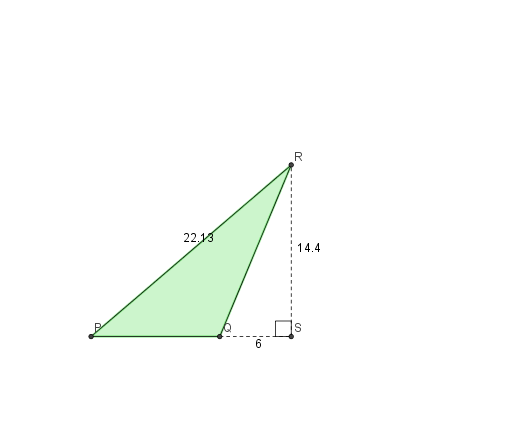
This example demonstrates the exploration of the relationship between the hypotenuse and the legs of a right triangle through dynamic construction and calculation, involving core math concepts like the Pythagorean theorem, coordinate geometry, and optimization problems in differential calculus. It utilizes commands and objects such as RandomElement, Segment, Midpoint, Polygon, Rotate, Angle, Random, Distance, and TableText from GeoGebra. Suitable for high school students learning coordinate geometry, calculus, and geometric constructions.
GeoGebra Commands & Parameters
RandomElement(Sequence[i / 10, i, 8, 15]) → kSegment(A_1, E) → bSegment(E, B_1) → cSegment(B_1, D_1) → dSegment(D_1, A_1) → eSegment(D_1, E) → fMidpoint(A_1, H1) → DPPolygon(A_1, B_1, D_1) → veelhoek1, d_1, a_1, b_1Rotate(A_1, hoek, DP) → ARotate(D_1, hoek, DP) → CRotate(E, hoek, DP) → E'Rotate(D_1, hoek, DP) → D'_1Rotate(E, hoek, DP) → DAngle(C, E', A) → αRandom(1, 2) → typeMidpoint(P_1, R_1) → DP2Polygon(P_1, Q_1, R_1) → veelhoek2, r, p, qSegment(Q_1, S_1) → aSegment(S_1, R_1) → gRotate(P_1, hoek, DP2) → PRotate(Q_1, hoek, DP2) → QRotate(R_1, hoek, DP2) → RPolygon(P, Q, R) → veelhoek2', r', p', q'Rotate(S_1, hoek, DP2) → SSegment(Q, S) → hSegment(S, R) → iDistance(P, Q) → PQDistance(Q, S) → QSDistance(R, S) → RSDistance(Q, R) → QRDistance(P, R) → PRTableText({{A10, B10, C10}, {A11, B11, C11}, {A12, B12, C12}, {A13, B13, C13}}, "|_") → tekst2Segment(S, R) → jSegment(Q, S) → lAngle(R, S, Q) → βSegment(P, Q) → mTableText({{A15, B15, C15}, {A16, B16, C16}, {A17, B17, C17}, {A18, B18, C18}}, "|_") → tekst7
AI Drawing Prompt Reference
Draw a right triangle with randomly generated leg lengths, dynamically rotate it to form a quadrilateral, label the rotation angle and side lengths, display multiple sets of data in a table, and calculate the side lengths and angle relationships of the rotated shapes.
The prompt above was compiled from the original drawing commands and is for reference only.