
Pythagorean Theorem Exploration (7): Interactive Geometry Puzzle
Loading the math board and drawing, please wait…
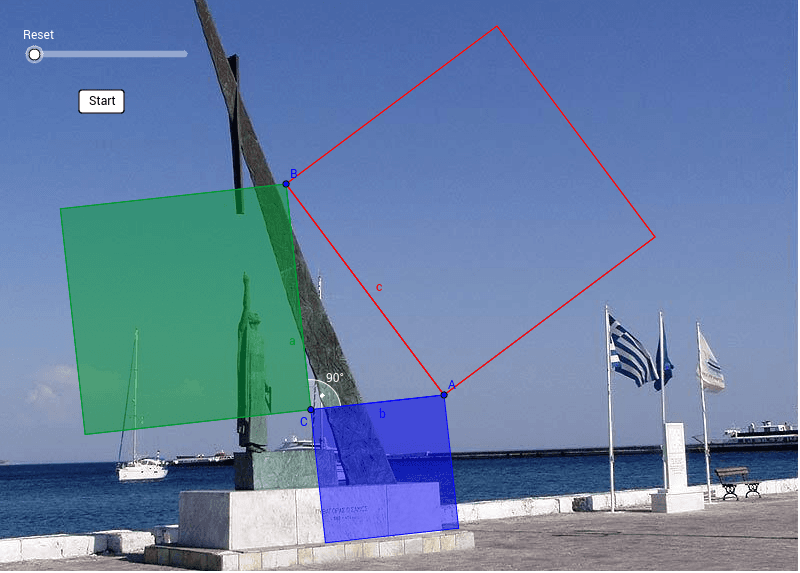
This example presents an interactive geometry puzzle that illustrates the Pythagorean theorem. ① It displays a right‑angled triangle with squares constructed on each side, allowing the viewer to see dynamically that the sum of the areas of the two smaller squares equals the area of the larger square (a² + b² = c²). ② The key mathematical ideas involve right triangles, distances between points, vector representation of sides, coordinate‑geometry calculations, and the geometric relationship of square areas. ③ The construction uses GeoGebra commands such as Distance (to measure side lengths), Point (to place vertices), Polygon (to draw the triangle and squares), Line (to connect points), Intersect (to find intersections), Circle and Semicircle (for auxiliary arcs), Segment (to outline edges), Midpoint (to locate midpoints), Angle (to check angles), and If (for conditional logic), together with objects like A, B, C, poly1, poly2, etc. ④ It is intended for high‑school geometry classes, middle‑school algebra enrichment, and mathematics competition preparation.
GeoGebra Commands & Parameters
Distance(A, B) → ncSemicircle(A, B) → zPoint(z) → CPolygon(C, B, 4) → poly4, c_3, b_2, h, i, H, ILine(H, I) → kPolygon(A, C, 4) → poly3, a_2, c_2, f, g, F, GLine(G, F) → jIntersect(j, k) → JCircle(J, If[n ≤ 0, -n, n]) → sSegment(J, I) → qLine(J, C) → lPolygon(A, B, C) → poly1, c, a, bIntersect(c, l) → KSegment(J, K) → pIntersect(s, If[n ≤ 0, q, p], 1) → I_1If(n ≤ 0, (x(C), y(C)), Translate[I_1, Vector[J, C]]) → C_1If(n ≤ nc, Translate[I_1, Vector[C, B]], (x(B), y(B))) → H_1If(n ≤ 0, (x(B), y(B)), Translate[H_1, Vector[J, C]]) → B_1Polygon(B, A, 4) → poly2, b_1, a_1, d, e, D, EMidpoint(A, B) → LSegment(J, F) → rDistance(C, K) → hcDistance(B, C) → naDistance(C, A) → nbIf(a > b, -a, -b) → nminPolygon(I_1, C_1, B_1, H_1) → poly5, m, t, c_1, d_1Intersect(s, If[n ≤ 0, r, p], 1) → F_1If(n ≤ nc, Translate[F_1, Vector[C, A]], (x(A), y(A))) → G_1If(n ≤ 0, (x(C), y(C)), Translate[F_1, Vector[J, C]]) → C1If(n ≤ 0, (x(A), y(A)), Translate[G_1, Vector[J, C]]) → A_1Polygon(G_1, A_1, C1, F_1) → poly6, g_1, a_3, c1, f_1Angle(A, C, B) → α
AI Drawing Prompt Reference
Create a right‑angled triangle with squares constructed outward on each of its three sides: two smaller squares on the legs and a larger square on the hypotenuse. The squares illustrate the Pythagorean theorem by showing that the sum of the areas of the two smaller squares equals the area of the larger square. Include auxiliary lines, circles, and intersection points that help visualize the relationship dynamically. The construction should allow the user to move the triangle’s vertices or control points to see how the areas change in real time, reinforcing the geometric proof of a² + b² = c². The overall layout should be clear, with the triangle and squares clearly labeled and positioned for easy observation.
The prompt above was compiled from the original drawing commands and is for reference only.