
Pythagorean Theorem and Cylinder
Loading the math board and drawing, please wait…
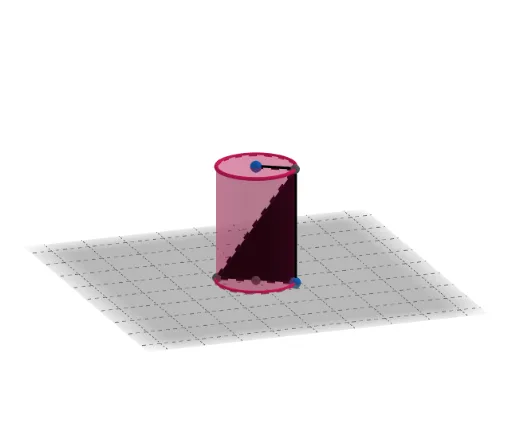
This example demonstrates the Pythagorean Theorem using a cylinder. It involves core concepts of geometry, coordinate geometry, and solid geometry. Using commands like Intersect, Point, Cylinder, Ray, and Segment, users can dynamically explore the relationship between the Pythagorean Theorem and the cylinder. Suitable for middle school and above students and teachers.
GeoGebra Commands & Parameters
Intersect(yAxis, xAxis) → APoint(zAxis) → BCylinder(A, B, 1) → a, c, d, bPoint(c) → CRay(C, A) → fIntersect(f, c) → D, ESegment(C, D) → gSegment(C, D) → hOrthogonalLine(C, xOyPlane) → iIntersect(i, d) → F,Polygon(F, C, D) → t1, d_1, f_1, c_1Polygon(F, D, C) → t2, c_2, f_2, d_2Segment(F, B) → j
AI Drawing Prompt Reference
Draw a 3D coordinate system with x, y, and z axes. Place a point at the origin and another point on the z-axis. Construct a cylinder of radius 1 with these two points as its axis. Pick a point on the cylinder's lateral surface. From this point, draw a ray toward the origin; this ray intersects the cylinder's surface at two points. Take one intersection point and connect it to the origin with a segment. Through the surface point, draw a line perpendicular to the horizontal plane; this line meets the top face of the cylinder at a point. Use this top point, the surface point, and the origin to form two triangles, one inside and one outside the cylinder. Finally, connect the top point to the point on the z-axis with a segment. The whole figure illustrates the Pythagorean theorem in relation to the cylinder.
The prompt above was compiled from the original drawing commands and is for reference only.