
Pyramid Section by Parallel Plane
Loading the math board and drawing, please wait…
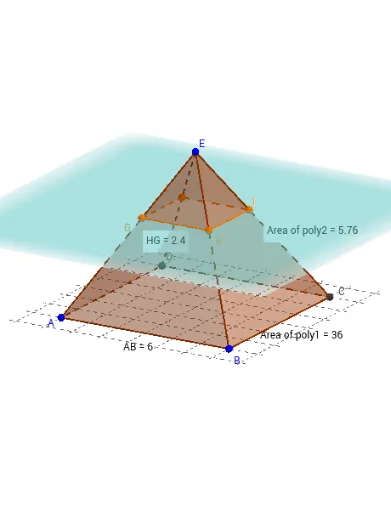
This example demonstrates the cross-section of a pyramid created by intersecting it with a plane parallel to its base. Key math concepts include solid geometry, properties of pyramids, and the intersection of a plane with a three-dimensional shape. The construction utilizes GeoGebra commands and objects such as PointIn, Polygon, Pyramid, Translate, IntersectPath, Distance, and Perimeter, highlighting the geometric relationships involved. It is suitable for high school geometry education, helping students visualize and understand the formation of pyramid sections and their properties, enhancing spatial reasoning skills.
GeoGebra Commands & Parameters
PointIn(xOyPlane) → BPointIn(xOyPlane) → APolygon(A, B, 4, xOyPlane) → poly1, a, b, c, d, C, DPyramid(poly1, E) → e, faceABE, faceBCE, faceCDE, faceADE, edgeAE, edgeBE, edgeCE, edgeDETranslate(xOyPlane, Vector[(0, 0, 3)]) → fIntersectPath(f, e) → poly2, poly3, g, h, i, j, k, l, m, n, G, H, I, J, K, L, M, NPointIn(poly2) → Pointpoly2PointIn(poly1) → Pointpoly1Distance(A, B) → distanceABDistance(H, G) → distanceHGPerimeter(faceABE) → perimeterfaceABE
AI Drawing Prompt Reference
Draw a square pyramid with a base and an apex above the center. Include a plane parallel to the base, intersecting the pyramid inside. Show the intersection line forming a smaller square section. Label the side lengths of the base and the section, highlighting the relationship between the pyramid's faces and the section, emphasizing geometric construction and spatial geometry concepts.
The prompt above was compiled from the original drawing commands and is for reference only.