
Pursuit Curve Triangle
Loading the math board and drawing, please wait…
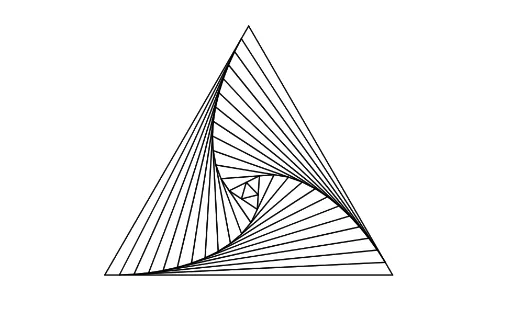
This example demonstrates the dynamic trajectory of pursuit curves within a triangle. Key math concepts include isosceles triangles, median value, circles, and sequences and series. Construction highlights involve commands like Polygon, Point, Circle, Centroid, Rotate, and Intersect in GeoGebra. Suitable for high school and above students exploring geometric dynamic changes and locus problems.
GeoGebra Commands & Parameters
Polygon(A, B, 3) → poly1, f, g, h, CPoint(f) → DCircle(A, D) → cCentroid(poly1) → ERotate(c, 120°, E) → c'Intersect(c', g, 1) → FPolygon(D, F, 3) → poly2, i, j, k, GCircle(D, A) → dCircle(F, B) → eIntersect(d, i, 1) → HIntersect(e, j, 1) → IPolygon(H, I, 3) → poly3, l, m, n, JCircle(H, D) → pCircle(I, F) → qIntersect(p, l, 1) → KIntersect(q, m, 1) → LPolygon(K, L, 3) → poly4, r, s, t, MCircle(K, H) → c_1Circle(L, I) → d_1Intersect(c_1, r, 1) → NIntersect(d_1, s, 1) → PPolygon(N, P, 3) → poly5, a, b, f_1, OCircle(N, K) → e_1Circle(P, L) → g_1Intersect(e_1, a, 1) → QIntersect(g_1, b, 1) → RPolygon(Q, R, 3) → poly6, h_1, i_1, j_1, SCircle(Q, N) → k_1Circle(R, P) → p_1Intersect(k_1, h_1, 1) → TIntersect(p_1, i_1, 1) → UPolygon(T, U, 3) → poly7, l_1, m_1, n_1, VCircle(T, Q) → q_1Circle(U, R) → r_1Intersect(q_1, l_1, 1) → WIntersect(r_1, m_1, 1) → ZPolygon(W, Z, 3) → poly8, s_1, t_1, a_1, A_1Circle(W, T) → c_2Circle(Z, U) → d_2Intersect(c_2, s_1, 1) → B_1Intersect(d_2, t_1, 1) → C_1Polygon(B_1, C_1, 3) → poly9, b_1, f_2, g_2, D_1Circle(B_1, W) → e_2Circle(C_1, Z) → h_2Intersect(e_2, b_1, 1) → E_1Intersect(h_2, f_2, 1) → F_1Polygon(E_1, F_1, 3) → poly10, i_2, j_2, k_2, G_1Circle(E_1, B_1) → p_2Intersect(p_2, i_2, 1) → H_1Circle(F_1, C_1) → q_2Intersect(q_2, j_2, 1) → J_1Polygon(H_1, J_1, 3) → poly11, l_2, m_2, n_2, I_1Circle(H_1, E_1) → r_2Circle(J_1, F_1) → s_2Intersect(r_2, l_2, 1) → K_1Intersect(s_2, m_2, 1) → L_1Polygon(K_1, L_1, 3) → poly12, t_2, a_2, b_2, M_1Circle(K_1, H_1) → c_3Circle(L_1, J_1) → d_3Intersect(c_3, t_2, 1) → N_1Intersect(d_3, a_2, 1) → O_1Polygon(N_1, O_1, 3) → poly13, f_3, g_3, h_3, P_1Circle(N_1, K_1) → e_3Circle(O_1, L_1) → k_3Intersect(e_3, f_3, 1) → Q_1Intersect(k_3, g_3, 1) → R_1Polygon(Q_1, R_1, 3) → poly14, i_3, j_3, l_3, S_1
AI Drawing Prompt Reference
Draw a triangle ABC, then construct a series of rotated and intersected circles and points inside the triangle to form a complex closed shape sequence. Start by constructing a triangle with vertices A, B, and C, then take a point D on side AB and draw a circle centered at D. Rotate this circle 120 degrees to get circle c', and find the intersection of c' with another side of the triangle to get point F. Continue this process to construct a series of circles and points, ultimately forming a complex closed shape sequence composed of multiple triangles.
The prompt above was compiled from the original drawing commands and is for reference only.