
Pseudosphere
Loading the math board and drawing, please wait…
In collections
geometriadinamica.es
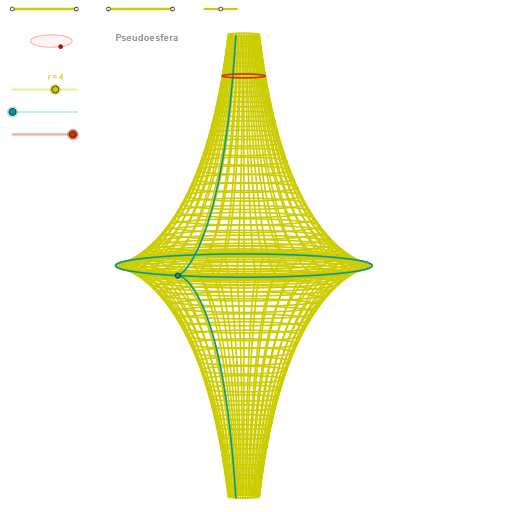
This example demonstrates the construction of a pseudosphere, a surface in hyperbolic geometry with negative curvature, similar to a sphere. Using GeoGebra commands such as Segment, Point, and OrthogonalLine, dynamic representations of points, lines, and curves on the pseudosphere are shown. Suitable for high school mathematics education, particularly in coordinate geometry and hyperbolic geometry.
GeoGebra Commands & Parameters
Segment(Q5, Q6) → p5Point(p5) → P5Segment(Q3, Q4) → p2Point(p2) → P3Segment(P3, Q4) → p4Point(p4) → P4Segment(Q1, Q2) → p1Point(p1) → P1Segment(P1, Q2) → p3Point(p3) → P2OrthogonalLine(C, xAxis) → zz2Circle(C, 0.62) → zz0Intersect(zz0, zz2, 1) → ZZ4Intersect(zz0, zz2, 2) → ZZ3Ellipse(ZZ3, ZZ4, 0.65) → zElipse2Point(zElipse2) → ZIntersect(zElipse2, zz2) → ZZ7, ZZ8Angle(ZZ8, C, Z) → zAngIncOrthogonalLine(C, yAxis) → zz1Intersect(zz0, zz1, 2) → ZZ2Intersect(zz0, zz1, 1) → ZZ1Ellipse(ZZ1, ZZ2, 0.65) → zElipse1Point(zElipse1) → XYIntersect(zElipse1, zz1) → ZZ5, ZZ6Angle(ZZ6, C, XY) → zAngRotSegment(ZZ5, ZZ6) → zz4Segment(ZZ7, ZZ8) → zz3Intersect(zElipse2, zElipse1, 1) → zPunto1Intersect(zElipse2, zElipse1, 4) → zPunto2Segment(zPunto1, zPunto2) → zSeg2CurveCartesian((r * ((cos(α) / cosh(u) * sin(zAngRot)) + (sin(α) / cosh(u) * cos(zAngRot)))), (r * (((((-cos(α))) / cosh(u) * cos(zAngRot)) * sin(zAngInc)) + ((sin(α) / cosh(u) * sin(zAngRot)) * sin(zAngInc)) + ((u - tanh(u)) * cos(zAngInc)))), u, u1, u2) → curva2Sequence(CurveCartesian[(r * ((cos(v) / cosh(u) * sin(zAngRot)) + (sin(v) / cosh(u) * cos(zAngRot)))), (r * (((((-cos(v))) / cosh(u) * cos(zAngRot)) * sin(zAngInc)) + ((sin(v) / cosh(u) * sin(zAngRot)) * sin(zAngInc)) + ((u - tanh(u)) * cos(zAngInc)))), v, v1, v2], u, u1, u2, paso) → list1ACurveCartesian((r * ((cos(v) / cosh(β) * sin(zAngRot)) + (sin(v) / cosh(β) * cos(zAngRot)))), (r * (((((-cos(v))) / cosh(β) * cos(zAngRot)) * sin(zAngInc)) + ((sin(v) / cosh(β) * sin(zAngRot)) * sin(zAngInc)) + ((β - tanh(β)) * cos(zAngInc)))), v, v1, v2) → a1CurveCartesian((r * ((cos(v) * sin(zAngRot)) + (sin(v) * cos(zAngRot)))), (r * ((((-cos(v)) * cos(zAngRot)) * sin(zAngInc)) + ((sin(v) * sin(zAngRot)) * sin(zAngInc)))), v, v1, v2) → curva1ASequence(CurveCartesian[(r * ((cos(v) / cosh(u) * sin(zAngRot)) + (sin(v) / cosh(u) * cos(zAngRot)))), (r * (((((-cos(v))) / cosh(u) * cos(zAngRot)) * sin(zAngInc)) + ((sin(v) / cosh(u) * sin(zAngRot)) * sin(zAngInc)) + ((u - tanh(u)) * cos(zAngInc)))), u, u1, u2], v, v1, v2, (2 * paso)) → list1
AI Drawing Prompt Reference
Draw a pseudosphere, a surface with negative curvature. Start with a center point and a small circle around it. Construct two perpendicular diameters through the center. On each diameter, mark two endpoints)Skip, and use each pair of endpoints as foci to draw two ellipses that intersect. Place a moving point on each ellipse and measure their angles relative to the center. Use these angles as rotation and tilt parameters to generate a family of parametric curves that weave together in space, forming a grid-like surface. Finally, add a boundary curve and a central curve on the surface to complete the shape.
The prompt above was compiled from the original drawing commands and is for reference only.