
Proportions in Similar Triangles by John Springall
Loading the math board and drawing, please wait…
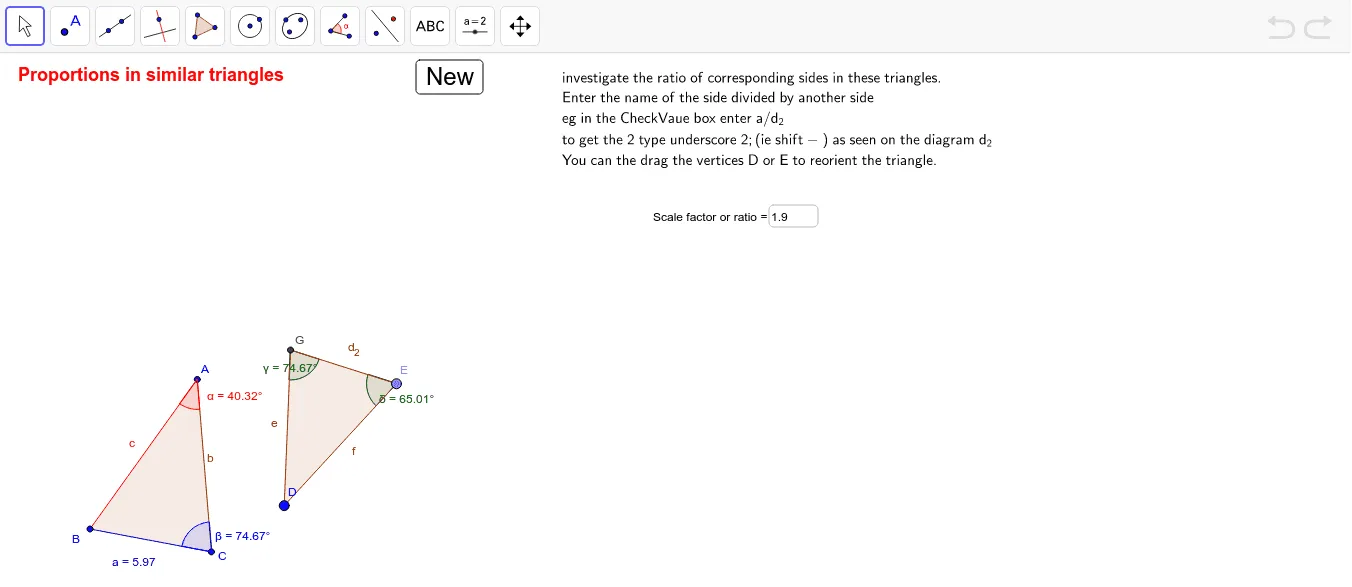
This example demonstrates the proportional relationships in similar triangles. Key mathematical concepts include the properties of similar triangles and proportions. Using GeoGebra commands such as Polygon, Angle, Line, Textfield, Rotate, and Dilate, similar triangles are constructed and their proportional relationships are observed. Suitable for students at the junior high school level and above.
GeoGebra Commands & Parameters
Polygon(A, B, C) → P, c, a, bAngle(P) → α_1, β_1, γ_1Line(B, C) → d_1Textfield(Answer) → InputBox2Angle(A, C, B) → βAngle(B, A, C) → αRotate(A, rotaterandom, H) → A'Rotate(B, rotaterandom, H) → B'Rotate(C, rotaterandom, H) → C'Polygon(A', B', C') → P', c', a', b'Dilate(A', scale) → A''Dilate(B', scale) → B''Dilate(C', scale) → C''Polygon(A'', B'', C'') → P'', c'', a'', b''Point(Circle[D, Segment[A'', B'']]) → ERotate(E + (Segment[B'', C''], 0), Angle[C'' - B''] + Angle[E - D] - Angle[B'' - A''], E) → FPolygon(D, E, F) → poly1, f, d_2, eIntersect(e, d_2) → GAngle(D, G, E) → γAngle(G, E, D) → δ
AI Drawing Prompt Reference
Draw two similar triangles to demonstrate equal angles and proportional sides. Start by drawing a triangle and labeling its three angles. Then randomly rotate the vertices to create a second triangle, labeling corresponding angles. Scale the second triangle to form a third. Connect corresponding vertices of the first two triangles, find the midpoint, draw a circle, and create a line segment through it. Rotate the intersection point to form a fourth triangle, labeling its angles. Finally, draw the medians of the two triangles, find their intersection, and label it.
The prompt above was compiled from the original drawing commands and is for reference only.