
Properties of a Rhombus and Square
Loading the math board and drawing, please wait…
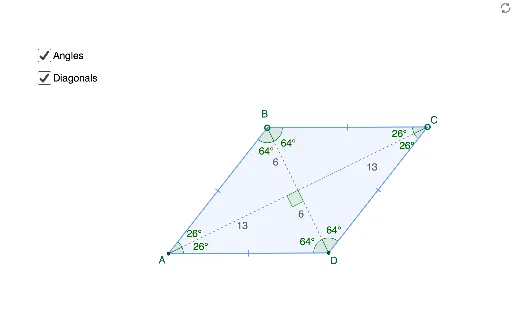
This interactive demonstrates the geometric properties of rhombuses and squares. It covers core concepts like polygons, angles, symmetry, and coordinate geometry. Construction involves commands such as Segment, Midpoint, OrthogonalLine, Point, Mirror, Polygon, and Angle. Ideal for middle school and high school students exploring geometric figures.
GeoGebra Commands & Parameters
Segment(A, C) → aMidpoint(a) → XOrthogonalLine(X, a) → bPoint(b) → BMirror(B, a) → DPolygon(A, B, C, D) → poly1, a_1, d, b_1, d'Segment(A, X) → cSegment(X, C) → eSegment(B, X) → fSegment(X, D) → gAngle(A, B, C) → αAngle(B, C, D) → βAngle(C, D, A) → γAngle(D, A, B) → δAngle(A, X, D) → εAngle(A, B, X) → ζAngle(X, B, C) → ηAngle(B, C, X) → θAngle(X, C, D) → ιAngle(C, D, X) → κAngle(X, D, A) → λAngle(D, A, X) → μAngle(X, A, B) → ν
AI Drawing Prompt Reference
Draw a rhombus and a square to demonstrate their geometric properties. Start by drawing one side of the rhombus, find its midpoint, draw a perpendicular line, locate a point on this line, mirror it to get the fourth vertex, and connect the four points to form the rhombus. Also, draw the diagonals' midpoints, connect them to the vertices to form the square. Label all interior angles and key segments to show symmetry and angle relationships.
The prompt above was compiled from the original drawing commands and is for reference only.