
Properties of a Kite by tyun
Loading the math board and drawing, please wait…
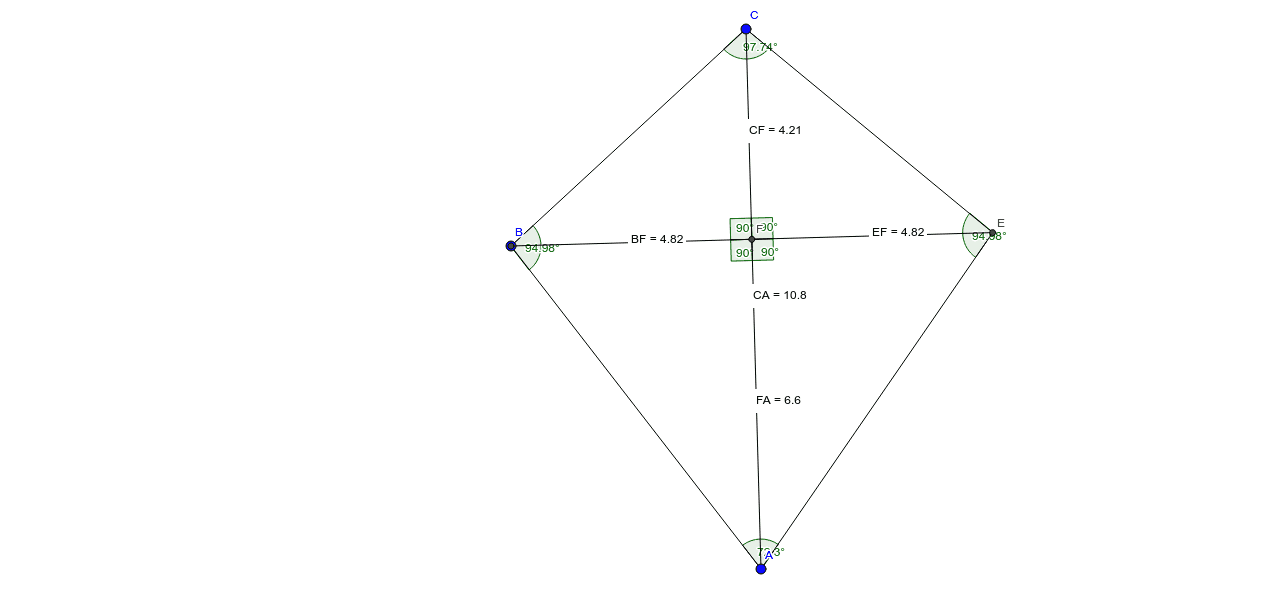
This example demonstrates the geometric properties and calculations related to a kite. It involves core concepts such as polygons, angles, distances, symmetry, and special points. The construction uses GeoGebra commands like Circle, Intersect, Segment, Angle, and Distance to build the kite and label relevant elements. Suitable for middle school students and math enthusiasts for learning and exploring the properties of geometric shapes.
GeoGebra Commands & Parameters
Circle(A, B) → cCircle(C, B) → dIntersect(d, c) → D, E, ,Segment(C, E) → aSegment(E, A) → bSegment(A, C) → eSegment(A, B) → fSegment(C, B) → gAngle(B, C, E) → αAngle(C, E, A) → βAngle(E, A, B) → γAngle(A, B, C) → δSegment(B, E) → hIntersect(h, e) → FDistance(F, A) → distanceFADistance(C, F) → distanceCFDistance(C, A) → distanceCADistance(E, B) → distanceEBDistance(B, F) → distanceBFDistance(E, F) → distanceEFAngle(C, F, B) → εAngle(E, F, C) → ζAngle(B, F, A) → ηAngle(A, F, E) → θ
AI Drawing Prompt Reference
Draw a kite ABCE where diagonals are perpendicular and equal. Start by placing points A, B, and C, then draw circles centered at B with radii AB and BC to find intersection point E. Connect points A, B, C, and E to form the kite. Measure and label all angles and side lengths, then find the intersection point F of diagonals AE and BC, and measure all relevant distances and angles.
The prompt above was compiled from the original drawing commands and is for reference only.