
Prime Number Family Members
Loading the math board and drawing, please wait…
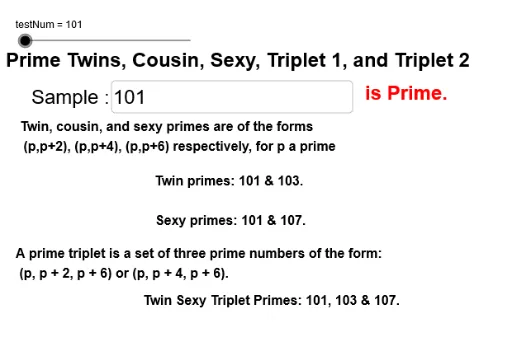
This example demonstrates the concept of prime numbers and their relationships through the generation and display of prime numbers. Core mathematical concepts include prime numbers, factorization, and prime number classification. Using GeoGebra commands such as Length, IsPrime, and Textfield, the example dynamically shows the generation process of prime numbers and their relationships. Suitable for students from upper elementary to middle school learning about prime numbers.
GeoGebra Commands & Parameters
Length(primeList) → lastPIsPrime(testNum) → prime1IsPrime(testNum + 2) → prime2IsPrime(testNum + 4) → prime4IsPrime(testNum + 6) → prime6Textfield(testNum) → InputBox1If(prime1 ≟ true, "is Prime.", "is NOT prime.") → primeIf(prime1 ≟ true ∧ prime2 ≟ true, "Twin primes: " + testNum + " & " + (testNum + 2) + ".") → twinIf(prime1 ≟ true ∧ prime6 ≟ true, "Sexy primes: " + testNum + " & " + (testNum + 6) + ".", "") → sexyIf(prime1 ≟ true ∧ prime4 ≟ true, "Cousin primes: " + testNum + " & " + (testNum + 4) + ".", "") → cousinLength(primeList) → lenIf(prime1 ≟ true, Append[primeList, testNum]) → testFactors(testNum) → factorListIf(prime1 ≟ true ∧ prime4 ≟ true ∧ prime6 ≟ true, "Cousin Sexy Triplet Primes: " + testNum + ", " + (testNum + 4) + " & " + (testNum + 6) + ".", "") → triplet2If(prime1 ≟ true ∧ prime2 ≟ true ∧ prime6 ≟ true, "Twin Sexy Triplet Primes: " + testNum + ", " + (testNum + 2) + " & " + (testNum + 6) + ".", "") → triplet1
AI Drawing Prompt Reference
Draw a series of prime numbers and show their relationships, including twin primes, cousin primes, sexy primes, and prime triplets. Start with a test number, check if it is a prime, and if so, add it to the prime list. Then check if the adjacent numbers are also primes to determine their relationships. Finally, display the corresponding text labels based on the relationships between the primes.
The prompt above was compiled from the original drawing commands and is for reference only.