
Practice Locating Points on the Coordinate Plane
Loading the math board and drawing, please wait…
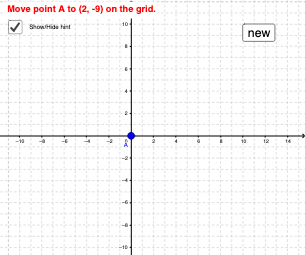
① This interactive applet demonstrates how to locate a point on the coordinate plane by moving Point A to the coordinates shown at the top. ② The core mathematical concept is the Cartesian coordinate system, including ordered pairs and the correspondence between coordinates and positions. ③ Construction details: The applet uses the Random command to generate random target coordinates, Polygon to create auxiliary shapes (such as squares or triangles) as background, text objects (text1, text3, etc.) to display the target coordinates, and a reset button (button1) to generate a new point. Point A is draggable for user interaction. ④ Suitable for middle school students learning coordinate geometry, and useful for classroom demonstrations or self-paced practice to reinforce coordinate reading and spatial reasoning skills.
GeoGebra Commands & Parameters
Random(-10, 10) → aRandom(-10, 10) → bPolygon(B, C, D, E) → poly1, b_1, c_1, d, e
AI Drawing Prompt Reference
Draw a coordinate plane with a draggable point A. Randomly generate a point on the coordinate plane and display its coordinates. Below the coordinate plane, draw a quadrilateral as a background with vertices at (-5, 5), (5, 5), (5, -5), and (-5, -5).
The prompt above was compiled from the original drawing commands and is for reference only.