
Practice Finding Slope
Loading the math board and drawing, please wait…
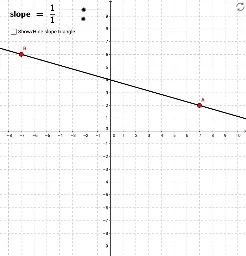
This example helps students practice identifying the slope of a randomly generated line. By adjusting sliders, students can intuitively understand the concept of slope. Constructed using GeoGebra commands such as Line, Vector, GCD, etc., it is suitable for students in middle school and above learning coordinate geometry.
GeoGebra Commands & Parameters
Line(A, B) → aVector(B, C) → uVector(C, A) → vGCD(rawrise, rawrun) → reducebyPolygon(D, E, F, G) → poly1, d, e, f, gSegment(H, I) → c
AI Drawing Prompt Reference
Create a coordinate geometry figure for practicing slope identification. Draw a randomly generated straight line with two key points marked on it. From one point, draw a vector indicating the direction change, and from the other point, draw a reverse vector to form a closed triangular path. Next to this, construct a rectangle using four points to illustrate the horizontal and vertical changes used in slope calculation. Finally, add a segment connecting two separate points as an additional reference. Include coordinate axes, grid lines, and slider controls to adjust the line's position and observe slope changes, suitable for middle school learning.
The prompt above was compiled from the original drawing commands and is for reference only.