
Practice Finding Slope by Duane Habecker
Loading the math board and drawing, please wait…
In collections
Coordinates and Linear Equations
Coordinates and Linear Equations
Coordinates and Linear Equations
Coordinates and Linear Equations
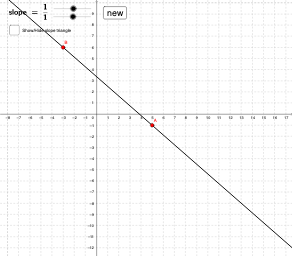
This example demonstrates generating random lines in a coordinate system and calculating their slope. Key math concepts include slope, vectors, and coordinate geometry. Construction involves commands like Line, Vector, GCD, Polygon, Segment, with objects such as A, B, a, rawrise, rawrun, and sliders to identify and simplify the slope. Suitable for middle school students and beyond learning vector and coordinate geometry, or for classroom demonstrations.
GeoGebra Commands & Parameters
Line(A, B) → aVector(B, C) → uVector(C, A) → vGCD(rawrise, rawrun) → reducebyPolygon(D, E, F, G) → poly1, d, e, f, gSegment(H, I) → c
AI Drawing Prompt Reference
Draw a coordinate plane with a random straight line passing through two marked points. Add two arrow vectors: one from the second point to a third point, and another from the third point back to the first point, forming a triangular path. Below the line, place a rectangular box that displays two integers representing the vertical and horizontal differences, along with a slider showing the simplified fraction of the slope. Inside the box, draw a segment connecting two labeled points to indicate the geometric meaning of the slope. Ensure the grid, axes, and all objects are clearly visible and related.
The prompt above was compiled from the original drawing commands and is for reference only.