
Practice: Finding Acute Angles of Right Triangles Using Inverse Trig Functions
Loading the math board and drawing, please wait…
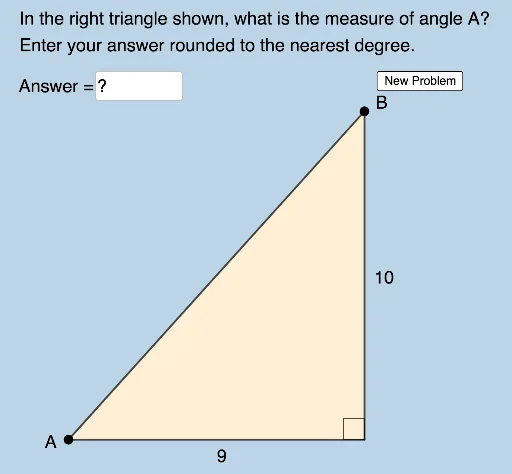
This example demonstrates how to measure acute angles within right triangles using inverse trigonometric functions. Key math concepts include angles, cosine, sine, trigonometry, and inverse functions. It is constructed using GeoGebra commands like Random, Polygon, Circle, Intersect, Segment, Angle, Element, and Textfield. Suitable for high school mathematics education to understand and apply inverse trig functions in practical problems.
GeoGebra Commands & Parameters
Random(2, 9) → aRandom(2, 10) → bRandom(a + 1, 10) → cPolygon(A, B_1, C) → t1, c_1, a_1, b_1Circle(A, c) → dIntersect(d, f, 1) → BPolygon(A, B_1, B) → t2, d_1, a_2, b_2Segment(A, B_1) → gSegment(B_1, B) → hSegment(B, A) → iSegment(C, B_1) → jSegment(C, A) → kAngle(B, B_1, A) → αRandom(1, 2) → mAngle(B_1, A, C) → βRandom(1, 2) → nElement(L1, n) → text1Element(L2, n) → text2Angle(B_1, A, B) → γTextfield(δ) → InputBox1Angle(A, C, B_1) → ηAngle(A, B, B_1) → θ
AI Drawing Prompt Reference
Draw a right triangle with randomly generated legs, then draw a circle using one leg as the radius. The intersection of the circle with the hypotenuse forms another triangle. Measure and label the three acute angles to demonstrate the use of inverse trigonometric functions.
The prompt above was compiled from the original drawing commands and is for reference only.