
Practice Factoring Trinomials
Loading the math board and drawing, please wait…
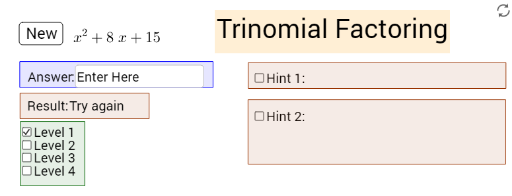
This example demonstrates interactive practice for factoring trinomials. It involves core math concepts like polynomial factoring, quadratic functions, and algebraic operations. Construction highlights the use of GeoGebra commands such as Coefficients, Simplify, Textfield, If, LaTeX, Polygon, AttachCopyToView, etc., to dynamically display results based on input coefficients. Suitable for middle school and above students for learning and practice.
GeoGebra Commands & Parameters
Coefficients(h) → list1Simplify(f) → gTextfield(h) → InputBox1Simplify(h) → iTextfield(p_a) → InputBox2Textfield(q_a) → InputBox3If(p ≟ p_a ∧ q ≟ q_a, j ≟ false ∧ e ≟ true) → kIf(p ≟ p_a ∧ q ≟ q_a, j ≟ false ∧ e ≟ true) → lLaTeX(test, true, true) → text6Polygon(A, B, C, D) → polyHint1, a_2, b_2, c_2, d_2Polygon(E, F, G, H) → polyHint2, e_2, f_2, g_2, h_2AttachCopyToView(polyHint1, 0, (-13.61033721841785, -11.743366090225695), (29.773303304999846, 11.281757544543183), (0, 449), (846, 0)) → poly1AttachCopyToView(polyHint2, 1, (-13.61033721841785, -11.743366090225699), (29.773303304999846, 11.281757544543183), (-6.999999999999998, 381), (839, -68)) → poly3AttachCopyToView(polyHint1, 1, (-13.405213622562448, -11.7433660902257), (29.97842690085525, 11.281757544543183), (-2.598594982838221, 383.0027209767809), (843.4014050171618, -65.99727902321901)) → poly4Polygon(I, J, K, L) → poly5, i_2, j_2, k_2, l_5AttachCopyToView(poly5, 1, (-11.046292270225313, -11.640804292298), (32.33734825319238, 11.384319342470883), (-535.5977186251548, 626.5040355133063), (310.40228137484496, 177.50403551330638)) → poly6Polygon(M, N, O, P) → poly2, m_2, n_2, o_2, p_2AttachCopyToView(poly2, 1, (-18.687146215839064, -16.768894188683053), (24.696494307578632, 6.256229446085831), (-22.099909519363543, 390.50578822867357), (823.9000904806364, -58.494211771326405)) → poly7Polygon(Q, R, S, T) → poly8, q_2, r_1, s_1, t_1AttachCopyToView(poly8, 1, (-17.200000145887387, -13.179231261213516), (26.183640377530313, 9.845892373555365), (-51.999999999999986, 429), (794, -19.999999999999996)) → poly9
AI Drawing Prompt Reference
Create an interactive graphic demonstrating the practice of factoring trinomials. Include an input box for entering coefficients and dynamically display the factoring results and corresponding quadratic function graphs. Use sliders to adjust coefficients, showing the step-by-step solution process with geometric shapes and text hints, culminating in a complete display of the solution steps.
The prompt above was compiled from the original drawing commands and is for reference only.