
Positive and Negative Rotation Angles Demo
Loading the math board and drawing, please wait…
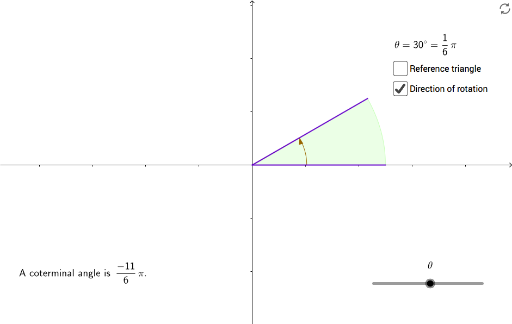
This example demonstrates the representation and calculation of positive and negative rotation angles in a plane. It involves core mathematical concepts such as angle measurement, the difference between positive and negative rotations, trigonometric applications, and symmetry. The construction highlights GeoGebra commands and objects like Intersect, CircleSector, Circle, Polygon, Angle, Segment, and If. Suitable for high school mathematics teaching to understand rotational transformations and the geometric meaning of trigonometric functions.
GeoGebra Commands & Parameters
Intersect(xAxis, yAxis) → ACircleSector(A, B, C) → cCircleSector(A, C, B) → eCircle(A, radius) → dCircle(A, radius) → fPolygon(A, C, D) → poly1, d_1, a, c_1Angle(B, A, Rotate[B, thetar, A]) → αAngle(C, A, Rotate[C, (-thetar), A]) → beta_1Segment(A, B) → hIf(num > 0, num - 48, 48 + num) → coterm
AI Drawing Prompt Reference
Draw a diagram on a plane showing positive and negative rotation angles, including an intersection point of coordinate axes, two sectors rotating in different directions, and a polygon connecting the intersection point to the vertices of the sectors, demonstrating the rotation effect with distinct colors for positive and negative rotation areas.
The prompt above was compiled from the original drawing commands and is for reference only.