
Polyhedrons with Reflections
Loading the math board and drawing, please wait…
In collections
Learn 3D Calculator
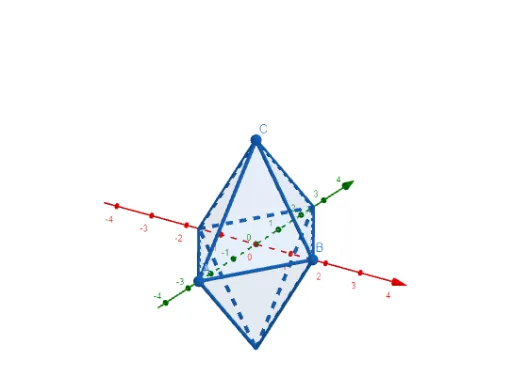
This example demonstrates how polyhedrons are transformed through reflection to create symmetric figures. Key math concepts include reflection, solid geometry, symmetry, ellipse, centroid, intersection, and indefinite integral. Construction highlights the use of GeoGebra commands/objects like Point, Polygon, Mirror, and Plane. Suitable for high school and above students studying spatial geometry and transformations.
GeoGebra Commands & Parameters
Point(yAxis) → APoint(xAxis) → BPoint(zAxis) → CPolygon(A, B, C) → t1, c, a, bMirror(t1, xOyPlane) → t1'Plane(yAxis, zAxis) → pMirror(t1, p) → t1'_{1}Mirror(t1', p) → t1''Plane(zAxis, xAxis) → qMirror(t1'_{1}, q) → t2Mirror(t1, q) → t1'_{2}Mirror(t1', q) → t1''_{1}Mirror(t1'', q) → t1'''
AI Drawing Prompt Reference
In 3D space, pick one point on each of the three coordinate axes)Skip and connect them to form a triangle. Reflect this triangle across the horizontal coordinate plane to get its mirror image. Then, using the vertical plane formed by two of the axes as a mirror, reflect both the original triangle and the first reflected triangle across this plane, producing two symmetric pairs. Next, using the other vertical plane formed by the remaining axes, reflect some of the previously obtained triangles again, resulting in a set of triangles symmetrically arranged around the axes. The final figure is a polyhedral-like structure showing reflection symmetry in multiple directions.
The prompt above was compiled from the original drawing commands and is for reference only.