
Polar Coordinates Boat Game by Woogon Chung
Loading the math board and drawing, please wait…
In collections
Polar Coordinates
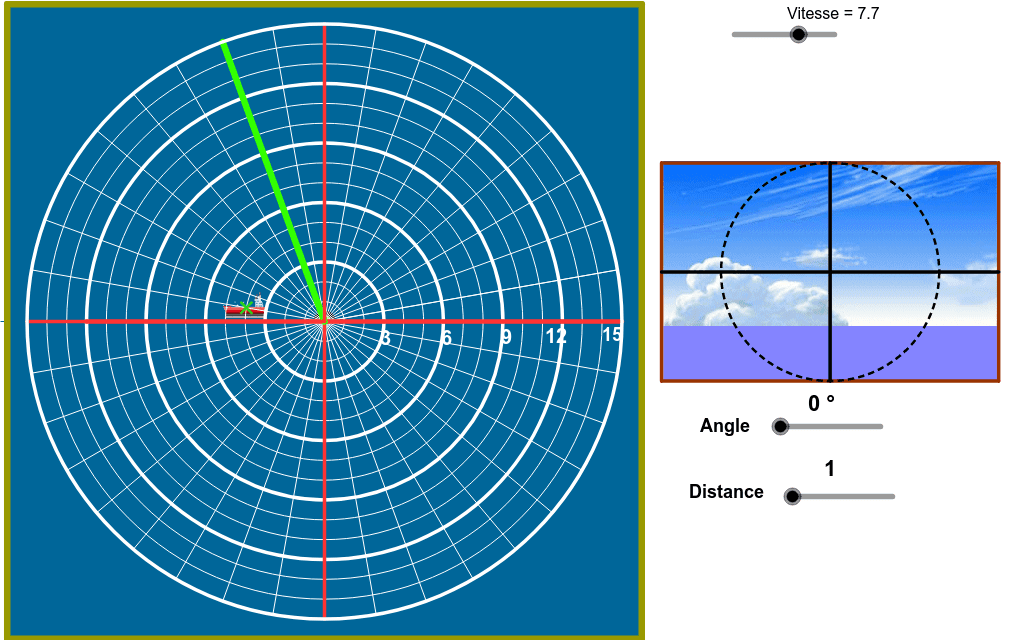
This example demonstrates the use of polar coordinates to locate a hidden boat on a 2D plane. It involves core mathematical concepts such as polar coordinate transformations, circle-line intersection calculations, random number generation, and geometric constructions. GeoGebra commands and objects used include Random, Circle, Ray, OrthogonalLine, Intersect, CircumcircleArc, Midpoint, Sequence, If, Angle, Segment, Polygon, Line, Rotate, Mod, and Point. It is suitable for high school mathematics classes to illustrate the application of polar coordinates, stochastic processes, and analytical geometry, as well as for math clubs and activities.
GeoGebra Commands & Parameters
Random(4.0, 15.0) → rrCircle(A, (1.5 * v - 1.0) * rr) → c'Ray(A, (0.0, 0.0)) → aOrthogonalLine(A, a) → bIntersect(c', b) → B, CIntersect(c', a) → D, TCircumcircleArc(B, D, C) → dMidpoint(C, D) → EMidpoint(B, D) → F_2Ray(A', E) → eRay(A', F_2) → fIntersect(d, e) → G,Intersect(d, f) → H,CircumcircleArc(G, D, H) → gCircle(I, 1.0) → hSequence(Text[If[s < 10.0, " ", ""] + (s), (21.6 + 2.0 * Mod[s - 1.0, 3.0], 7.75 - 2.0 * Div[s - 1.0, 3.0])], s, 1.0, 12.0) → liste3Circle(J, 1.0) → kSequence(Text[If[s ≟ 1.0, " ", If[s < 5.0, " ", ""]] + (30.0 * (s - 1.0)) + "º", (21.25 + 2.0 * Mod[s - 1.0, 3.0], -(6.25) - 2.0 * Div[s - 1.0, 3.0])], s, 1.0, 12.0) → liste4If(yB > -(5.0), 5.0*°, ((xB - 3.0 * yB) / 2.0 - 19.0 - 1.0) * 30.0°) → angIf(ang ≟ α ∧ dist ≟ rr, true, false) → razAngle((1.0, 0.0), (0.0, 0.0), A) → βSegment(O, N) → mCircle(A, (2.0 * v - 1.0) * rr - n) → pSequence(Circle[A, (1.5 * v - 1.0) * rr - i], i, 0.0, n, n / 10.0) → liste5Polygon(P, Q, R, S) → poly1, p_1, q, r_1, sAngle((1.0, 0.0), (0.0, 0.0), A) → γCircle((0.0, 0.0), If[2.0 * v * rr > 12.0, 0.0, 2.0 * v * rr]) → cMidpoint(K, L) → UMidpoint(U, L) → VMidpoint(U, V) → WMidpoint(V, L) → ZSegment(K, C_1) → lLine(A, l) → iSegment(A, U) → tIntersect(c, t) → A_1, B_1Segment(U, A_1) → a_1Circle(U, W) → c_1Circle(U, V) → d_1Circle(U, Z) → e_1Circle(U, L) → f_1Rotate(C_1, 6.0 * v, U) → L'Segment(U, L') → b_1Mod(v * 100.0, 2.0) → abSequence(Circle[(0.0, 0.0), t], t, 1.0, 15.0) → liste1Sequence(Segment[(0.0, 0.0), (15.0; 2.0 * 3.141592653589793 * t / 36.0)], t, 0.0, 37.0) → liste2Segment(O, D_1) → jCircle(O, C_1) → g_1Point(g_1) → E_1Segment(O, E_1) → h_1Circle(U, C_1) → k_1Circle(F_1, 8.0 - r / 2.5) → q_1Line(F_1, l) → i_1Intersect(q_1, i_1) → G_1, H_1Line(J_1, r_1) → j_1Point(j_1) → N_1Line(N_1, l) → l_1Line(J_1, l) → m_1Point(m_1) → O_1Point(l_1) → P_1Intersect(l_1, r_1) → M_1Polygon(M_1, N_1, J_1, F) → poly2, m_2, n_1, j_2, f_2Point(l_1) → Q_1Point(m_1) → R_1Polygon(P_1, Q_1, R_1, O_1) → poly3, p_2, q_2, r_2, o_1Point(j_1) → S_1Point(o_1) → T_1Polygon(S_1, T_1, O_1, J_1) → poly4, s_1, t_1, o_2, j_3Midpoint(s_1) → V_1Midpoint(o_2) → W_1Midpoint(S_1, J_1) → Z_1Midpoint(t_1) → A_2Segment(V_1, W_1) → a_2Segment(Z_1, A_2) → b_2Intersect(b_2, a_2) → B_2Circle(B_2, V_1) → c_2
AI Drawing Prompt Reference
On a 2D plane, use polar coordinates to locate a hidden boat. Start by drawing a ray and its perpendicular line, then create a circle based on a randomly generated polar coordinate. Find the intersection points of the circle with the ray. Use these points to draw arcs and segments to form the boat's shape. Add a slider to control the circle's size and position, and display angle information as text to illustrate the application of polar coordinates.
The prompt above was compiled from the original drawing commands and is for reference only.