
Pointed Arch Geometric Construction
Loading the math board and drawing, please wait…
In collections
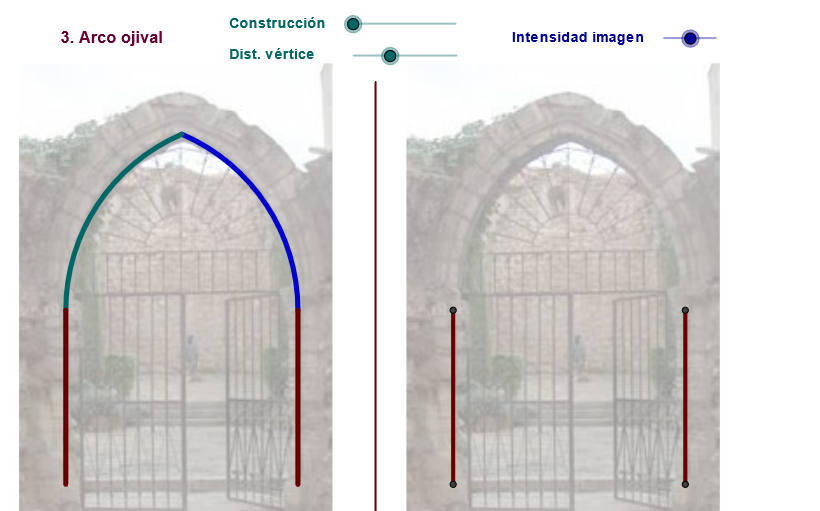
geometriadinamica.es
This GeoGebra example demonstrates the geometric construction of a pointed arch (Arco Ojival), a classic architectural element commonly found in Gothic architecture. A pointed arch is formed by two intersecting arcs meeting at a pointed top. Key mathematical concepts involved include: center and arc relationships, central angles, rotation and mirror symmetry, vector translation, angle bisectors, and more. Construction highlights: Using Circle command to draw base circles, Arc/CircleArc commands to create arcs, Rotate for rotation transformations, Mirror for reflection, Midpoint to find midpoints, Intersect to find intersections, Angle to measure angles, Vector to create vectors, Translate for translation, Line for drawing lines, CircumcircleArc for circumscribed arcs. This example is suitable for upper secondary school and early undergraduate students, applicable for geometry construction teaching, coordinate geometry introduction, transformation concept demonstration, and architectural geometry foundations.
GeoGebra Commands & Parameters
Segment(D, B) → eMidpoint(C, D) → KRotate(C, Max[(-ε), (((-(u - 2)) * ε) * 180 / 3.14 / (2°))], K) → C'_2Circle(K, C) → f_1Midpoint(C, D) → FLine(F, e) → kIntersect(f_1, k, 1) → LCircle(L, C'_2) → g_1Center(g_1) → OIntersect(f_1, g_1, 1) → MMirror(M, k) → M'_1Circle(F, i) → pIntersect(p, k, 2) → GMidpoint(C, D) → ESegment(A, C) → dSegment(E, C) → fRotate(C, Max[((-(c - 3)) * 180 / (5°)), 180°], E) → C'Rotate(C, 359.91000000000014°, E) → C''CircumcircleArc(C, C'', C') → gSegment(C', E) → hSegment(G, C) → lIf(zz < 0, 10, zz) → nSegment(C, F) → rCircle(C, m) → sIntersect(s, r, 1) → HCircle(H, D) → tIntersect(t, k) → I, JAngle(D, H, I) → βSegment(H, D) → a_1Rotate(D, Min[β, (((n - 3) * β) * 180 / 3.14 / (5°))], H) → D'Segment(H, D') → b_1CircleArc(H, D, D') → c_1Mirror(H, k) → H'Mirror(D', k) → D''Segment(H', D'') → d_1Mirror(H, k) → H'_1Mirror(D, k) → D'_1Mirror(D', k) → D''_1Arc(Mirror[Circle[H, D], k], D'_1, D''_1) → e_1Intersect(f_1, g_1, 2) → NIntersect(g_1, k, 2) → PSegment(K, C) → h_1Segment(K, C'_2) → i_1CircleArc(K, C'_2, C) → k_1Mirror(C'_2, k) → QSegment(K, Q) → l_1CircleArc(K, D, Q) → q_1CircumcircleArc(Q, O, M) → t_1Rotate(C, (-ε), K) → C'_3Circle(L, C'_3) → p_1Mirror(L, k) → L'Mirror(L, k) → L'_1Mirror(M, k) → M'Circle(K, C) → c_2Segment(T1, T) → n_1Mirror(D, n_1) → D'_2Mirror(B, n_1) → B'Segment(D'_2, B') → e'Mirror(A, n_1) → A'Mirror(C, n_1) → C'_4Segment(A', C'_4) → d'Vector(A, B') → zTranslate(pic1, z) → pic1'Translate(pic1, z) → pic1'_1
AI Drawing Prompt Reference
Draw a classic Gothic architectural element - a pointed arch. The arch is formed by two intersecting arcs meeting at a pointed top. Key objects include two circles, multiple arcs, line segments, and points. The construction sequence involves: first, drawing two circles as the base of the arch; then, drawing arcs to connect the circles; next, rotating and reflecting these arcs to form the arch's top; finally, drawing line segments and points to connect and mark the arch's key parts.
The prompt above was compiled from the original drawing commands and is for reference only.