
Planes & Planes
Loading the math board and drawing, please wait…
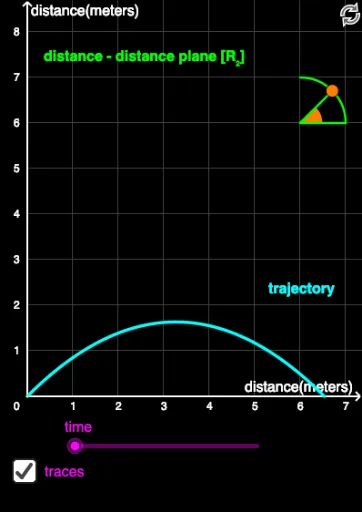
This example demonstrates different types of planes. It involves key mathematical concepts such as the geometric properties of planes and coordinate geometry. Using GeoGebra commands like CircleArc, Point, Segment, Angle, and CurveCartesian, various planes can be constructed. Suitable for high school and above students to learn analytic and solid geometry.
GeoGebra Commands & Parameters
CircleArc(C, F, G) → cPoint(c) → HSegment(C, H) → jAngle(F, C, H) → αCurveCartesian((V0_x * t), (V0_y * t) - ((0.5 * 9.8) * t^(2)), t, 0, (2 * V0_y / 9.8)) → aSegment(A, D) → gSegment(X, E) → hSegment(Y, E) → fSegment(B, A) → iSegment(F, C) → k
AI Drawing Prompt Reference
Draw a geometric diagram showing different types of planes. Start with a circular arc, place a point on it, and connect that point to the center with a segment. Mark the angle formed by the center, one arc endpoint, and the point. Then draw a parabolic curve representing projectile motion under gravity. Finally, add several segments connecting various points to form a framework of intersecting planes, including horizontal, slanted, and vertical lines, illustrating the spatial relationships between planes.
The prompt above was compiled from the original drawing commands and is for reference only.