
Two Rectangles in a Square II
Loading the math board and drawing, please wait…
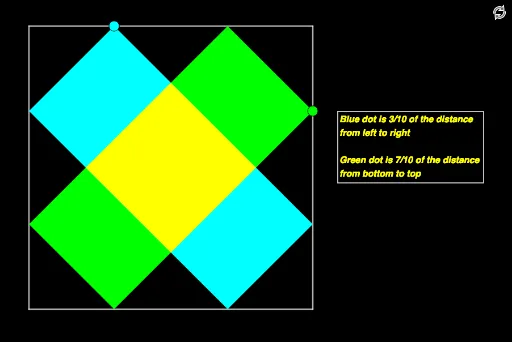
This example demonstrates the overlapping of two rectangles within a square. It involves basic properties of rectangles and squares, and how to construct these shapes using GeoGebra commands such as Segment (line segment), Midpoint (midpoint), Point (point), Circle (circle), Intersect (intersection), and Polygon (polygon). Suitable for students at the middle school level and above to learn geometric construction and basic geometric concepts.
GeoGebra Commands & Parameters
Segment(C, D) → hMidpoint(h) → NSegment(D, N) → sSegment(B, C) → gMidpoint(g) → KSegment(K, C) → bSegment(A, B) → fSegment(D, A) → iPoint(b) → ESegment(E, C) → jCircle(C, j) → cCircle(A, j) → dIntersect(c, h) → F,Intersect(d, f) → G,Intersect(d, i) → H,Segment(F, H) → kSegment(H, G) → lSegment(G, E) → mSegment(E, F) → nSegment(E, B) → pPoint(s) → ISegment(I, D) → qCircle(D, q) → eIntersect(e, i) → J,Circle(B, q) → rIntersect(r, p) → L, SIntersect(r, f) → M,Polygon(J, I, L, M) → q1, j_1, i_1, l_1, m_1Intersect(k, i_1) → OIntersect(i_1, m) → PIntersect(m, m_1) → QIntersect(m_1, k) → RPolygon(O, P, Q, R) → q2, o, p_1, q_1, r_1Polygon(E, F, H, G) → q3, e_1, f_1, h_1, g_1Polygon(I, J, M, L) → q4, i_2, j_2, m_2, l_2